Black Friday Sale: up to 80% off every Pro planBlack Friday Sale: up to 80% off every Pro planBlack Friday Sale has ended. Regular prices apply: see pricing.
17d:06h:47m:45sEnds Dec 15 at 6:59 pm EST.See pricing
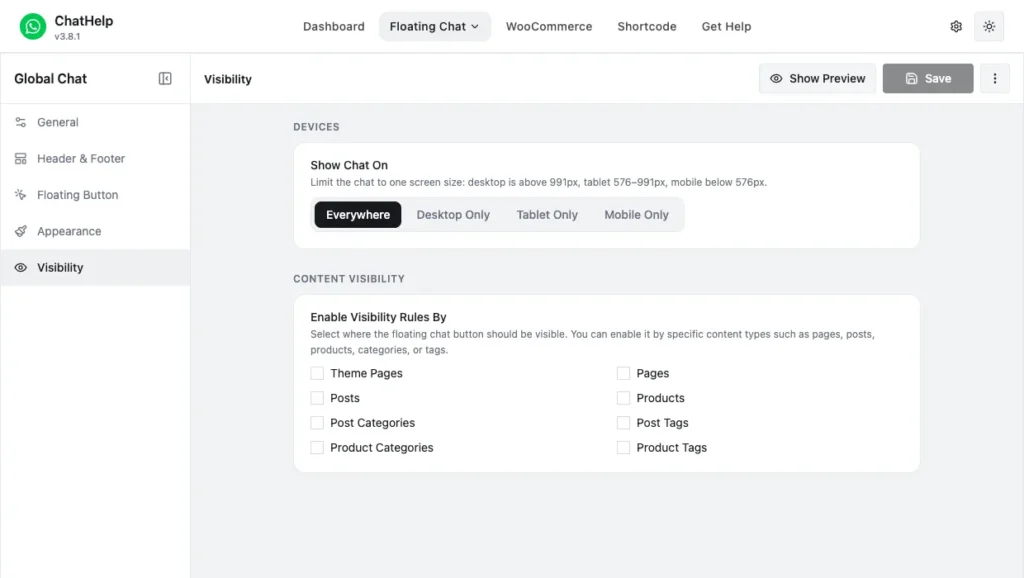
In WhatsApp Chat → Floating Chat → Global Chat, open the Visibility tab. Show Chat On limits the chat to desktop, tablet or mobile. Enable Visibility Rules By includes or excludes theme pages and posts in the free version, and pages, products, post categories and tags, and product categories and tags in Pro.
Limit the chat to one screen size: desktop is above 991px, tablet 576–991px, mobile below 576px. Options: Everywhere, Desktop Only, Tablet Only, Mobile Only.
Select where the floating chat button should be visible. You can enable it by specific content types such as pages, posts, products, categories, or tags. Options: Theme Pages, Pages (Pro), Posts, Products (Pro), Post Categories (Pro), Post Tags (Pro), Product Categories (Pro), Product Tags (Pro).
Choose whether to show (Include) or hide (Exclude) the chat bubble on the selected items. Options: Include, Exclude.
Free
All Theme Pages
Enable this option to apply the chat bubble visibility rule to all theme pages at once, instead of selecting them individually.
Free
Theme Pages
Select a specific theme page where the chat bubble visibility rule should apply. Options include Blog, 404, or Search pages. Options: Blog Page, 404 Page, Search Page.
Choose whether to show (Include) or hide (Exclude) the chat bubble on the selected products. Options: Include, Exclude.
Pro
All Products
Enable this option to apply the chat bubble visibility rule to all products across your store, instead of selecting them individually.
Pro
Products
Select one or more specific products where the chat bubble visibility rule should apply. Options: Round Pendant Lamp, Metal Hanging Lights, Hanging Plant, Wooden Vases, Golden Lamps, Wooden Greenery, Hand Made Pottery, Rattan Lamp, Ceramic Blue Vase.
Start free from WordPress.org. Upgrade to Pro for team chat with several agents, the Advance button, dark mode, unlimited form fields, visibility rules and webhooks.