
Free + Pro Most settings are in the free version; settings marked Pro need Chat Help Pro.
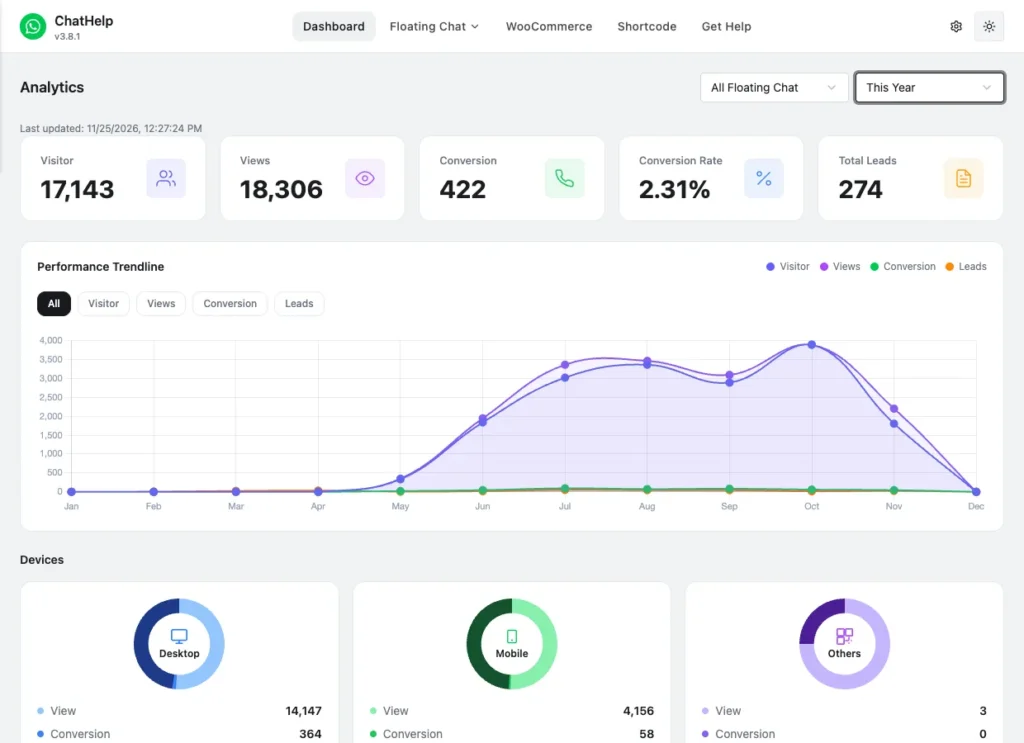
The dashboard analytics show how many visitors see the chat, start a conversation and become a lead.
Read the dashboard analytics #
WhatsApp Chat → Dashboard shows how your chats perform: visitors, chat views, conversions (clicks that open WhatsApp) and leads, with a trend chart, a desktop/mobile split and date ranges such as this week, this month or your own dates. Pro adds a traffic breakdown by country, page and browser.
How tracking works #
- Each layout records a conversion at the moment the visitor opens WhatsApp.
- The browser sends at most one small tracking request per page view.
- Search engines and other known bots are not counted.
- Logged-in editors are not counted unless you switch on Track Logged-in Editors in Settings → Analytics.
- Raw events are kept for 90 days by default; the reports keep their full history.
Dashboard analytics: still have a question? Ask in the Chat Help forum on WordPress.org (opens in a new tab), or open a support ticket with Pro.
