
Free Works in Chat Help Free and Pro.
Use dynamic variables in the single form (Form Chat) layout to put the visitor’s answers in the message.
Insert dynamic variables in the single form #
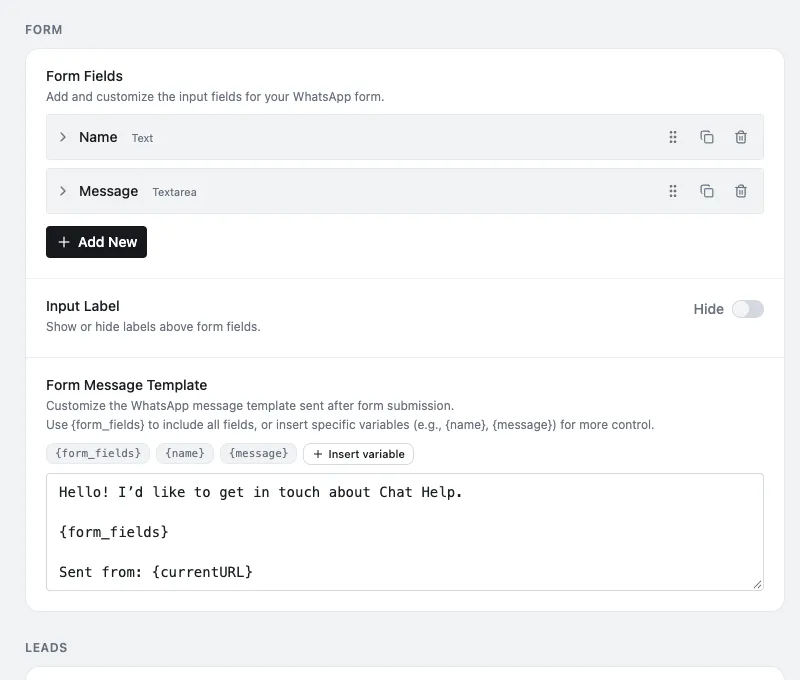
In Form Message Template, insert a field by its label: a field labelled “Name” is {name}, “Your Email” is {your_email}. Fields with the same label are numbered: {name_1}, {name_2}. {form_fields} inserts all answers. Use the Insert variable menu beside the field.
All variables are listed on the message variables page.
Example #
A form with the fields “Name”, “Email” and “Message”, and this template:
Hi, I’m {name} ({email}).
{message}

Sent from {currentTitle}: {currentURL}
arrives in WhatsApp as the visitor’s own words, with the page they were on. Required fields are checked before WhatsApp opens.
Dynamic variables in the single form: still have a question? Ask in the Chat Help forum on WordPress.org (opens in a new tab), or open a support ticket with Pro.
