


The plugin provides a dedicated WhatsApp Button block for the WordPress Gutenberg editor. This allows you to insert and customize a WhatsApp button without needing shortcodes.
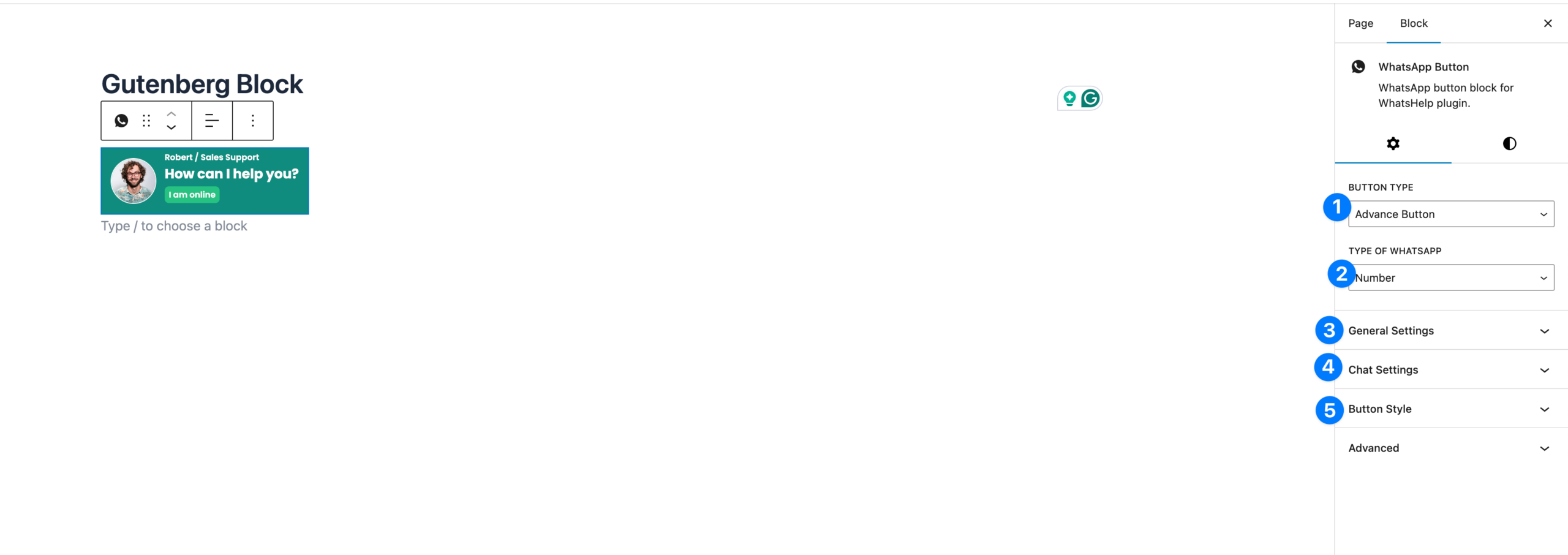
Options in Gutenberg Block #
- Button Type
- Choose the button layout style:
- Advance Button → Displays agent photo, name, designation, and status (like “I am online”).
- Simple Button → Clean minimal button with just label and icon.
- Choose the button layout style:
- Type of WhatsApp
- Select how the button should function:
- Number → Connects to a direct WhatsApp number.
- Group → Connects to a WhatsApp group invite link.
- Select how the button should function:
- General Settings
- Manage button text, icons, padding, margin, and visibility.
- Similar to shortcode/elementor settings but directly editable inside Gutenberg.
- Chat Settings
- Configure WhatsApp number, pre-filled message, timezone, and availability (same as Floating Chat options).
- Supports dynamic variables like
{siteTitle},{currentURL},{productName}, etc.
- Button Style
- Adjust primary and secondary colors.
- Choose size, typography, and alignment for the button.
- Custom CSS classes can be added under Advanced.


