


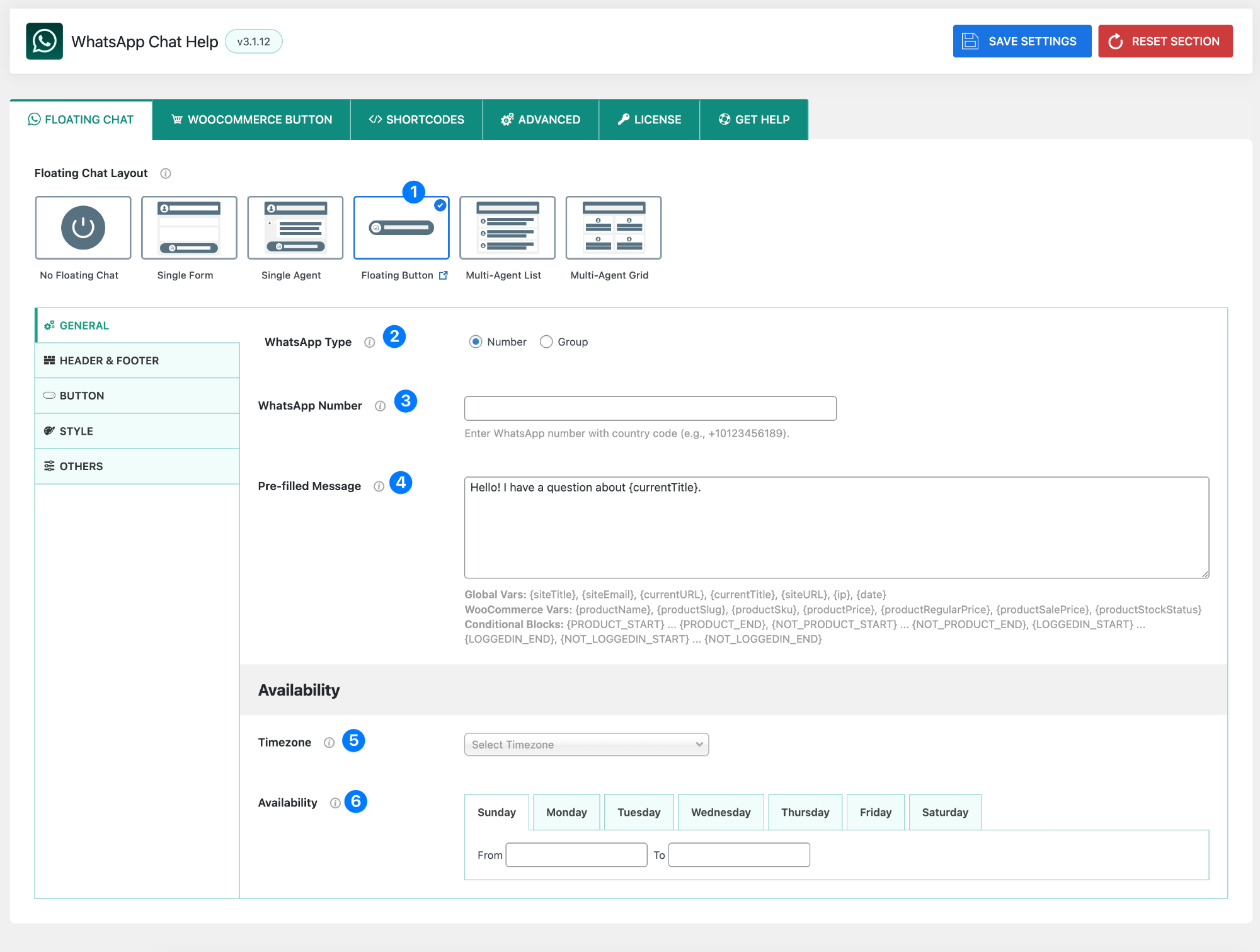
The Floating Button layout provides a straightforward WhatsApp buttons for users to quickly start a chat. It doesn’t display extra agent details—just a button linked directly to your WhatsApp number or group.
- Layout Selector – Floating Button: Select the Floating Button layout from the Floating Chat Layout options. This shows only a clickable button without agent profile, subtitle, or header details.
- WhatsApp Type: Choose how visitors connect with you:
- Number → Users send direct messages to your WhatsApp number.
- Group → Users join your WhatsApp group via an invite link.
- WhatsApp Number / Group Link:
- If Number is selected → Enter your WhatsApp number in international format.
Example:+880234563246274 - If Group is selected → Enter your WhatsApp group invite link.n invite link.
- If Number is selected → Enter your WhatsApp number in international format.
👉 A Test link appears automatically so you can confirm it’s working.
- Pre-filled Message: Default text that appears inside WhatsApp when the user clicks the button.
- Helps users start a chat quickly.
- Can use dynamic variables for personalization (explained in variables section).
- Example:
Hello! I have a question about {currentTitle}.
- Timezone: Select your timezone to ensure availability hours are matched correctly.
- Availability: Set which hours you are available to receive messages.
- Choose start and end times for each day.
- Use 00:00 to 00:00 to mark yourself offline for a full day.
Variables for Pre-filled Message #
Global Variables #
{siteTitle}– Website title{siteEmail}– Website email{currentURL}– Current page URL{currentTitle}– Current page/post title{siteURL}– Base website URL{ip}– Visitor’s IP address{date}– Current date
WooCommerce Variables #
(Only work on product pages, inside {PRODUCT_START} … {PRODUCT_END})
{productName}– Product name{productSlug}– Product slug{productSku}– SKU code{productPrice}– Current product price{productRegularPrice}– Regular product price{productSalePrice}– Sale price{productStockStatus}– Stock status
Conditional Blocks #
{PRODUCT_START} … {PRODUCT_END}→ Show only on product pages{NOT_PRODUCT_START} … {NOT_PRODUCT_END}→ Show only on non-product pages{LOGGEDIN_START} … {LOGGEDIN_END}→ Show only to logged-in users{NOT_LOGGEDIN_START} … {NOT_LOGGEDIN_END}→ Show only to logged-out users
The Simple Button layout is ideal when you want a minimal chat trigger without extra profile or message box details.


