
WhatsApp QR Code for Desktop Visitors
Most people use WhatsApp on their phone. On a computer, Chat Help can show a QR code when a visitor hovers a chat button, so they scan it and continue on their phone with the message already written. In the free version.
On a computer, open the chat in the corner and hover the Send Message button to see the QR code. It never shows on phones.
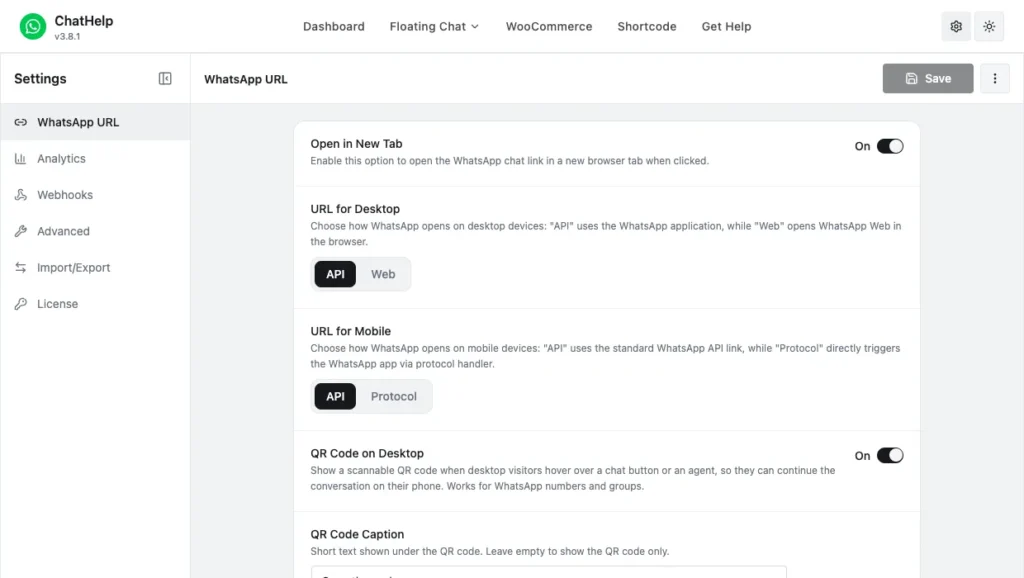
How it works
What it does
Scan to continue
The code opens WhatsApp on the phone with your number and the pre-filled message, or the group invite.
After the form
On form layouts, the code appears once the required fields are filled in, with the same message the form would send.
Follows your rules
It respects GDPR consent and opening hours, and appears on WooCommerce, shortcode, block and Elementor buttons too.
What you can change in the WhatsApp QR code
- QR Code on Desktop (off by default)
- QR Code Caption (“Scan the code” by default)
- URL for desktop: API or WhatsApp Web
- URL for mobile: API or app protocol
- Open in a new tab
Use cases
Who it is for
Desktop visitors
People on a computer continue on their phone in seconds.
Forms
The code carries the same message the form would send.
Shops
The product message travels to the phone too.
Set up
Set up the WhatsApp QR code in three steps
Turn it on
Go to Chat Help → Settings → WhatsApp URL and switch on QR Code on Desktop.
Write a caption
Set the text under the code, or leave it empty.
Done
Every chat button now shows the code to desktop visitors on hover.
Step-by-step: Advanced controls
Video
Watch how it works
Add WhatsApp chat to WordPress: complete Chat Help setup guide · Watch on YouTube (opens in a new tab)
From the blog
Related guides
 How to Create a WhatsApp Click-to-Chat Link (With & Without a Plugin)Ask visitors to fill out a contact form and many of them quietly leave. Ask them to message…Read the guide
 WhatsApp vs WhatsApp Business: Which One for Your Website?You’ve just finished your website. It looks great, the contact page works, and now you want that little…Read the guide
 How to Get a WhatsApp Business Number for Your Website (2026 Guide)You’ve decided to add WhatsApp to your website. Then the questions start. Can you use your personal number?…Read the guide
More demos
More buttons and features
- Icon Button FreeA round WhatsApp icon in the corner that opens WhatsApp.Open the live demo
- Simple Button FreeThe WhatsApp icon with your own label, such as “Chat with us”.Open the live demo
- Advance Button ProA floating button with your photo, labels and online status.Open the live demo
- Button Shortcode FreeA WhatsApp button anywhere shortcodes work.Open the live demo
- Button Block FreeA WhatsApp button block for the block editor.Open the live demo
- Elementor Widget FreeA WhatsApp button widget for Elementor.Open the live demo
- WooCommerce Product Button FreeA button by Add to Cart, with the product in the message.Open the live demo
- WooCommerce Buttons FreeButtons on the shop, cart, checkout and thank-you pages.Open the live demo
- Message Variables FreePage, product, cart and form answers in the message.Open the live demo
- Analytics and Leads FreeViews, conversions and every lead in WordPress.Open the live demo
- All features Every Chat Help feature on one page.See every feature
- Free vs Pro What the free plugin does, and what Pro adds.Compare
From WordPress.org
What users say
The plugin works perfectly and the team is very professional. I purchased the Pro version and the experience has been excellent. The plugin works perfectly and the team is very professional. I requested a couple of new features and they developed them without any issues and in a short time.
uomiguel (opens in a new tab) on WordPress.org Awesome Plugin for WhatsApp Floating Chat & WooCommerce Order. This plugin worked great for my website, Order Via WhatsApp. It also provides a floating chat icon, which is helpful as well.
mohsinworld (opens in a new tab) on WordPress.org Effective for WhatsApp Chat Support! I am using this plugin to provide support to my customers through WhatsApp. It’s really effective and they can connect with me very easily using their WhatsApp. They don’t need to save our number manually.
firststepstogether (opens in a new tab) on WordPress.org
Questions about the WhatsApp QR code
No. It only shows on desktop, where scanning makes sense.
Yes. The code opens the group invite link.
Yes.
Yes, with the QR Code Caption setting, or leave it empty.