

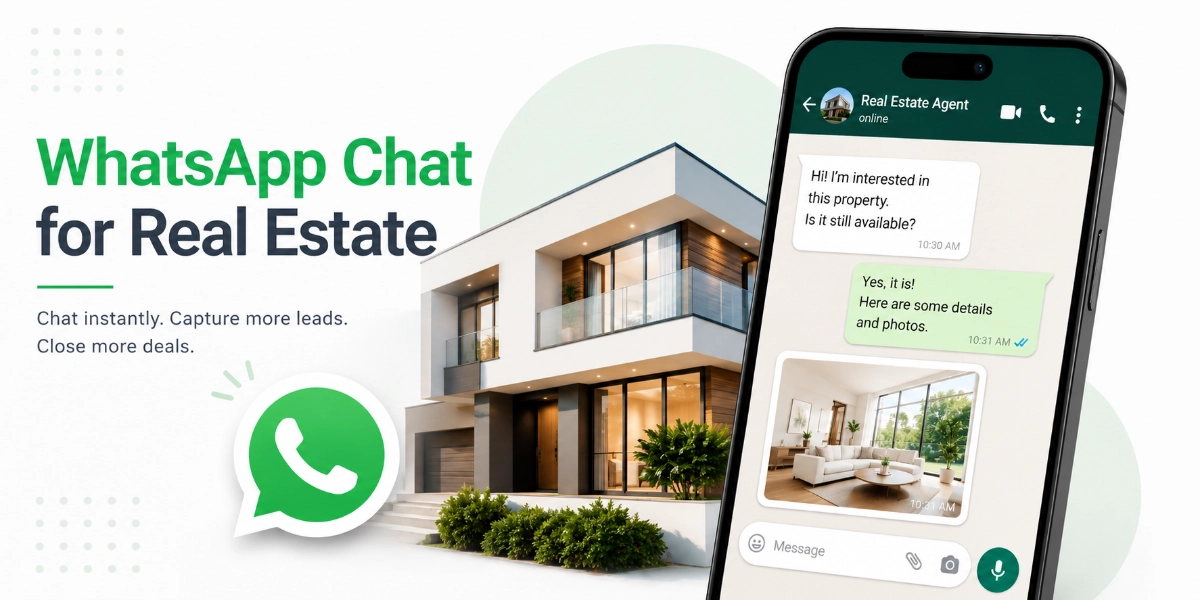

A buyer finds your listing at 9 p.m., loves the photos, and has one quick question about parking. They see a contact form asking for their name, email, phone number, and “message.” They close the tab. That lead is gone — and it happens on real estate websites every single day.
This is exactly the problem WhatsApp for real estate solves. Instead of forcing buyers through a form they’ll probably abandon, you let them tap one button and ask their question in the app they already use to talk to friends and family. You reply from your phone, the conversation stays open, and a casual question turns into a viewing.
In this guide, you’ll learn why WhatsApp outperforms contact forms for property inquiries, seven specific ways agents use it to capture more leads, and how to add a WhatsApp chat button to your website in about five minutes — no technical skills required.
Key Takeaways
- Speed wins listings: sales research consistently shows that leads contacted within minutes convert at a dramatically higher rate than leads contacted hours later — and WhatsApp is built for minute-level replies.
- WhatsApp messages are typically opened and read far more reliably than email, which makes it a stronger channel for time-sensitive property inquiries.
- A WhatsApp chat button on your property website removes the biggest lead-capture barrier: nobody wants to fill out a contact form for a one-line question.
- WhatsApp lets agents share photos, floor plans, brochures, and video walkthroughs inside the same conversation — something forms and phone calls can’t do.
- Real estate agents can add WhatsApp chat to a WordPress website in about five minutes using a free plugin like ChatHelp — no coding needed.
- WhatsApp Business is free, and its profile, quick replies, and away messages let solo agents look responsive around the clock.
Table of Contents
Why WhatsApp for Real Estate Beats Contact Forms and Email
Property leads are perishable. A buyer browsing listings tonight is messaging three other agents tonight, and whoever answers first usually gets the viewing. Contact forms and email simply weren’t designed for that race — WhatsApp was.
Think about how a form works. The buyer fills in five fields, hits submit, and hears… nothing. Maybe an auto-reply. Their question sits in your inbox until you check it, and by the time you respond, the emotional momentum — “I love this house” — has faded. Email follow-ups then fight for attention against promotions and spam.
Now compare that to a chat message. It lands on your phone with a notification. You answer in a sentence. The buyer replies instantly because they’re still on your listing, still excited. That’s a conversation, not a ticket in a queue.
| Contact form | WhatsApp chat | ||
|---|---|---|---|
| Typical response rhythm | Hours to days | Hours to days | Minutes |
| Likely to be seen? | Only if you check the inbox | Often buried or filtered | Read almost immediately |
| Photos, videos, floor plans | No | Clunky attachments | Native, instant |
| Ongoing conversation | One-shot submission | Slow threads | Continuous, stays open |
| Effort for the buyer | Five fields and a captcha | Writing a formal message | One tap, one line |
There’s a compounding benefit, too. Once a buyer messages you on WhatsApp, you have a direct, personal channel for the entire journey — new questions, more photos, viewing reminders, offer updates. A form gives you one submission. A chat gives you a relationship.
7 Ways Real Estate Agents Use WhatsApp to Capture More Leads
You don’t need a marketing team to make this work. Each tactic below is something a solo agent can set up this week, and together they turn WhatsApp from “the app I already use with clients” into a real estate lead WhatsApp system that works while you’re showing houses.
1. Put a WhatsApp chat button on every listing page
This is the foundation. A floating chat button on your listings means every visitor — desktop or mobile — is one tap away from a conversation. No form, no friction, no “I’ll contact them later” (they won’t).
The button should sit on every page where buying intent exists: individual listings, neighborhood pages, your valuation page, even your about page. If someone is curious enough to ask, make asking effortless.
2. Use pre-filled messages so leads arrive with context
A pre-filled message means that when a visitor taps the chat button on a specific listing, their message box already says something like: “Hi, I’m interested in the 3-bed on Maple Street — is it still available?” They just hit send.
This does two jobs at once. It lowers the effort for the buyer to nearly zero, and it tells you exactly which property they’re asking about — so your first reply can be specific and useful instead of “Which listing do you mean?”
3. Send brochures, floor plans, and video walkthroughs instantly
When a buyer asks about a property, replying with a PDF brochure, a floor plan, and a 60-second video walkthrough in the same minute is a genuine wow moment. It’s the digital version of handing over a glossy brochure at an open house — except you did it from your car between viewings.
Keep a folder of ready-to-send assets for each active listing. When the inquiry comes in, you’re not scrambling; you’re impressing.
4. Book property viewings right inside the chat
Why push someone to a scheduling page when you’re already talking? Offer two or three time slots in the chat, confirm one, and send a reminder the morning of the viewing. The whole exchange takes four messages.
Buyers appreciate it because it feels like texting a friend, not booking a dentist appointment. And a viewing confirmed in a live conversation is far less likely to become a no-show — you’re a real person to them now.
5. Follow up with past inquiries — personally, and with permission
Every WhatsApp conversation you’ve had is a warm contact who already reached out to you. When a similar property hits the market, a short personal message — “You asked about the Maple Street 3-bed in March; a very similar one just listed two blocks over. Want the details?” — feels like service, not spam.
The key word is personal. One relevant message to one past inquirer works. Blasting your whole contact list does not — and it can get your number flagged. More on that in the best-practices section below.
6. Capture after-hours and weekend leads
A huge share of property browsing happens at night and on weekends — exactly when nobody answers the office phone. A WhatsApp button captures those leads instead of losing them.
Even if you’re asleep, the message is waiting on your phone at 7 a.m., with the buyer’s question and the listing context attached. Pair it with a WhatsApp Business away message (“Thanks! I’ll reply first thing in the morning”) and the lead knows they’ve been heard. Compare that to a missed call with no voicemail.
7. Use WhatsApp click-to-chat links in your property ads
Your website isn’t the only place this works. WhatsApp click-to-chat links (wa.me links) can go in Facebook and Instagram ads, Google Business Profile, email signatures, QR codes on yard signs, and listing portals that allow them.
A “Message us on WhatsApp” ad button routes the click straight into a conversation with you — skipping the landing page and the form entirely. For mobile-heavy audiences, that’s the shortest possible path from ad spend to a live lead.
[Suggested Post: How to create WhatsApp click-to-chat links]
Adding WhatsApp Chat to Your Real Estate Website in 5 Minutes
If your website runs on WordPress — and most agent and brokerage sites do — you can do this yourself with the free ChatHelp plugin. No developer, no code, no monthly SaaS fee to get started. Here’s the whole process.
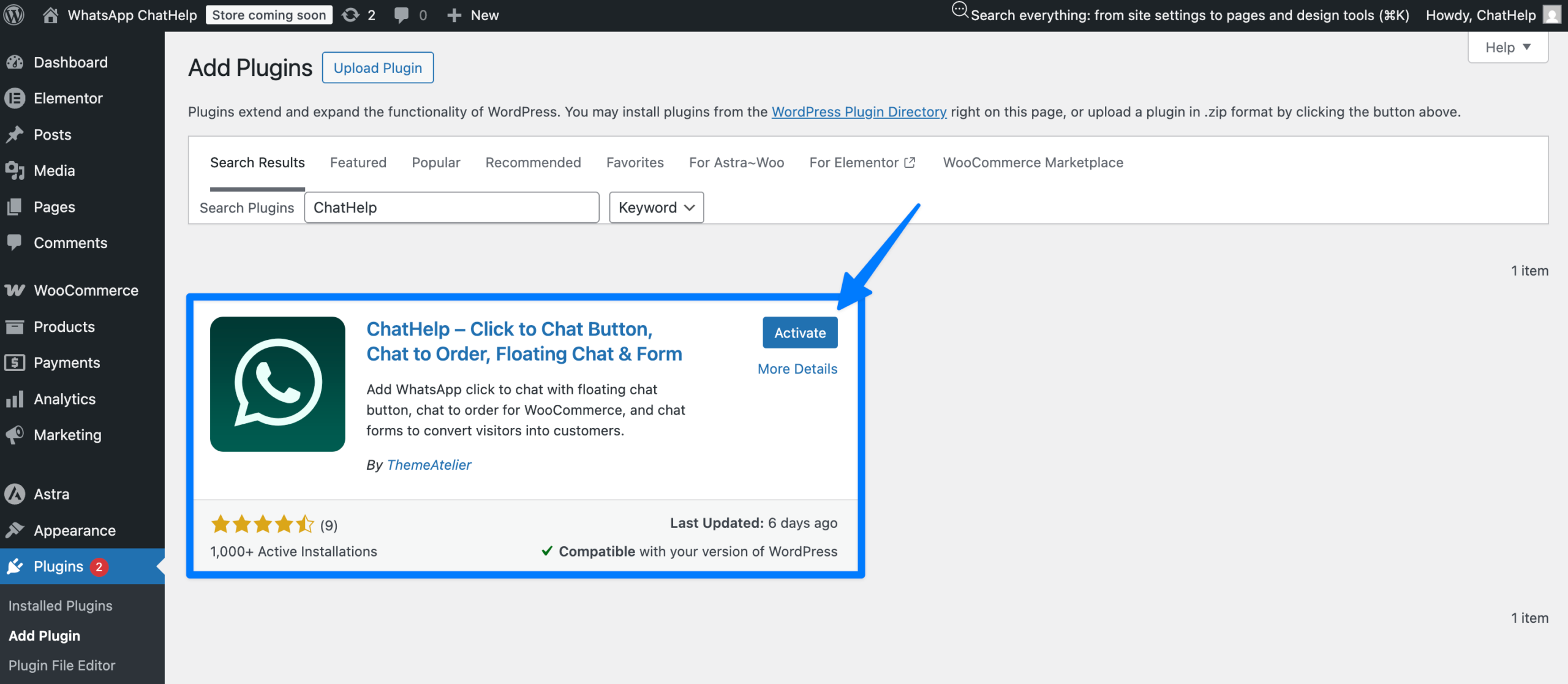
Step 1: Install the free ChatHelp plugin
Log in to your WordPress dashboard, go to Plugins → Add New, and search for “Chat Help”. Click Install Now, then Activate. That’s the technical part done.
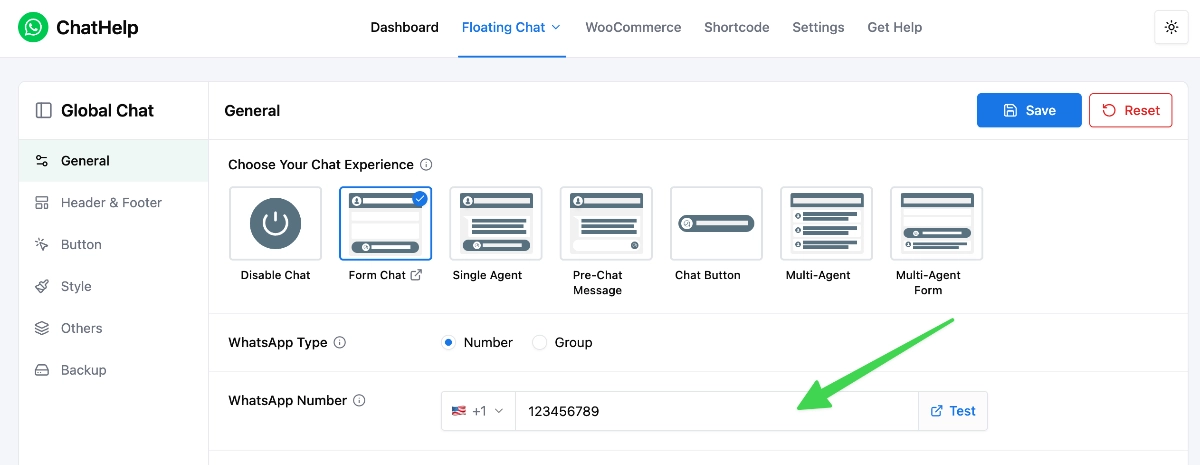
Step 2: Add your WhatsApp number
Open the ChatHelp settings and enter the WhatsApp number where you want inquiries to land — ideally your WhatsApp Business number, with the country code. This is the number buyers will message when they tap the button.
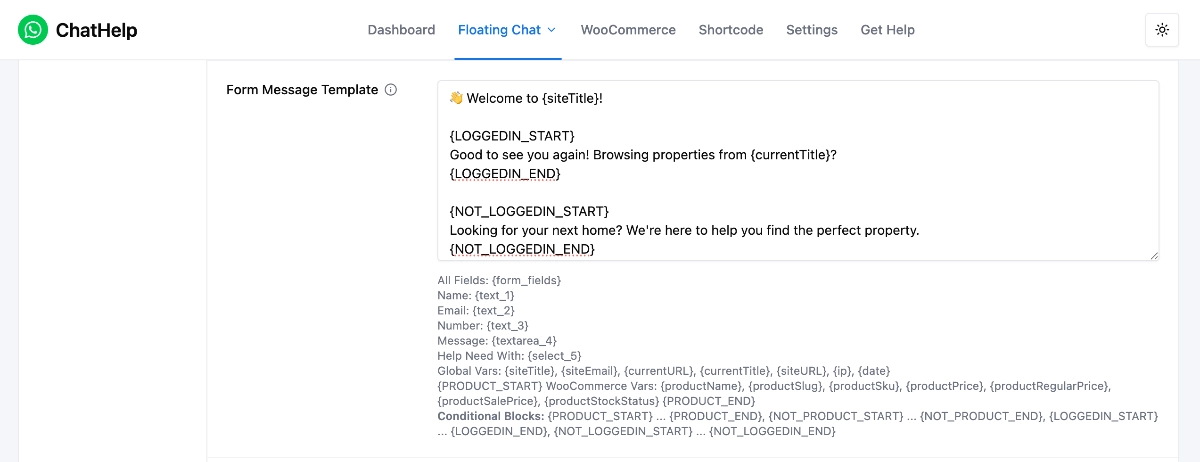
Step 3: Write your greeting message
Set the message visitors see when the chat widget opens. Keep it warm and specific: “Hi! 👋 Looking at a property? Ask me anything — I usually reply within a few minutes.” A named, human greeting outperforms a generic “How can we help you?”
Step 4: Choose where the widget appears
Pick the button position (bottom-right is the convention buyers expect) and which pages show it. At minimum, enable it on all listing pages and your homepage. Then save.
Step 5: Test it from your phone
Open your website on your phone, tap the chat button, and send yourself a test message. If it lands in your WhatsApp, you’re live. Total time: about five minutes.
Free vs. Pro: what do you actually need?
The free version of ChatHelp covers the essentials above — a WhatsApp chat button connected to your number, which is genuinely all a solo agent needs on day one. ChatHelp Pro adds features that matter as you grow: multiple agents so inquiries route to the right person, departments (sales vs. rentals vs. property management), and pre-filled messages so each listing page starts the chat with property context.
Honest advice: start free. If you’re a team, or you want per-listing pre-filled messages (tactic #2 above), that’s when Pro earns its keep.
Best Practices: Getting Real Results Without Annoying Anyone
The chat button gets leads to your phone. What happens next decides whether they become clients. Four habits separate agents who win with WhatsApp from agents who just have another unread inbox.
Set a response-time standard — and say it out loud
Aim to reply within minutes during working hours. If you can’t, say so in your greeting and away messages (“I reply within an hour during the day”). A stated expectation you meet beats a fast reply the buyer wasn’t sure was coming.
Set up a proper WhatsApp Business profile
The free WhatsApp Business app gives you a business profile (photo, agency name, hours, website link), quick replies for questions you answer daily, and automated away messages. It takes twenty minutes to set up and makes every conversation look professional from the first message.
Keep client chats separate from personal ones
Use a dedicated business number (WhatsApp Business can run alongside personal WhatsApp on the same phone). Your leads stay organized, your weekend photos stay private, and if you ever add a team member, handing over a business number is painless.
Message with consent, not cold
Reply to people who message you first, and ask before adding anyone to update lists (“Want me to WhatsApp you when similar properties come up?”). Unsolicited bulk messages annoy buyers, can breach local privacy and messaging rules, and can get your number restricted by WhatsApp. Permission first — always.
Frequently Asked Questions
How do real estate agents use WhatsApp?
Agents use WhatsApp to answer property inquiries in real time, share brochures, floor plans, and video walkthroughs, schedule viewings, and follow up with past leads. Many add a WhatsApp chat button to their website so visitors can start a conversation instantly instead of filling out a contact form.
How do I add WhatsApp to my real estate website?
On WordPress, install a free plugin like ChatHelp, enter your WhatsApp number, write a greeting message, and choose where the chat button appears. The whole setup takes about five minutes and requires no coding. Visitors then tap the button and message you directly.
Is WhatsApp Business free for realtors?
Yes. The WhatsApp Business app is free to download and use, and it includes a business profile, quick replies, away messages, and labels for organizing leads. Costs only appear if you later move to the WhatsApp Business API, which is designed for large teams with high message volume.
Can multiple agents handle WhatsApp chats from one website?
Yes. With a multi-agent chat plugin such as ChatHelp Pro, you can list several agents or departments in the widget, so a visitor picks who to message — sales, rentals, or a specific agent. Each conversation goes straight to that person’s WhatsApp number.
Will WhatsApp chat work for a small, one-agent business?
Arguably it works best for solo agents. You already carry your phone everywhere, so you can answer leads between viewings without an office or an assistant. The free version of a chat plugin plus the free WhatsApp Business app is a complete lead-capture setup at zero cost.
Start Capturing the Leads Your Contact Form Is Losing
Every day your website runs without a chat option, some buyer with a quick question closes the tab and messages another agent instead. That’s the real cost of doing nothing — and it’s invisible, because you never see the leads you lose.
WhatsApp for real estate isn’t a complicated marketing system. It’s meeting buyers where they already are, answering fast, and keeping the conversation open until the deal closes. The strategy costs nothing to try: install ChatHelp free, add your number, and see what a week of instant conversations does to your inquiry count. When your team grows, upgrade to Pro for multiple agents, departments, and per-listing pre-filled messages.