


WhatsApp Chat Help plugin update 3.5.0 is here, and it’s the biggest change to the plugin’s admin experience to date. We’ve rebuilt the entire settings panel from the ground up, added a live preview so you can see widget changes as you make them, and introduced Global WhatsApp Defaults that let you manage your number and group in one place. This release focuses on making the plugin faster to configure and easier to live with, whether you run a single blog or a busy WooCommerce store.
Table of Contents
What’s New in the WhatsApp Chat Help Plugin Update
Version 3.5.0 (released 14 July 2026) is a headline release for the admin side of the plugin. The front-end WhatsApp chat widget your visitors see continues to work exactly as before, but almost everything on the settings side has changed for the better. Here’s the short version of what this WhatsApp Chat Help plugin update delivers:
- Global WhatsApp Defaults so you can set your number and group once and have it flow everywhere.
- A completely redesigned admin panel with a cleaner layout, better navigation, and more breathing room.
- A React-powered interface that behaves like a fast single-page app instead of reloading on every click.
- The shadcn/ui component library integrated throughout for a consistent, accessible design.
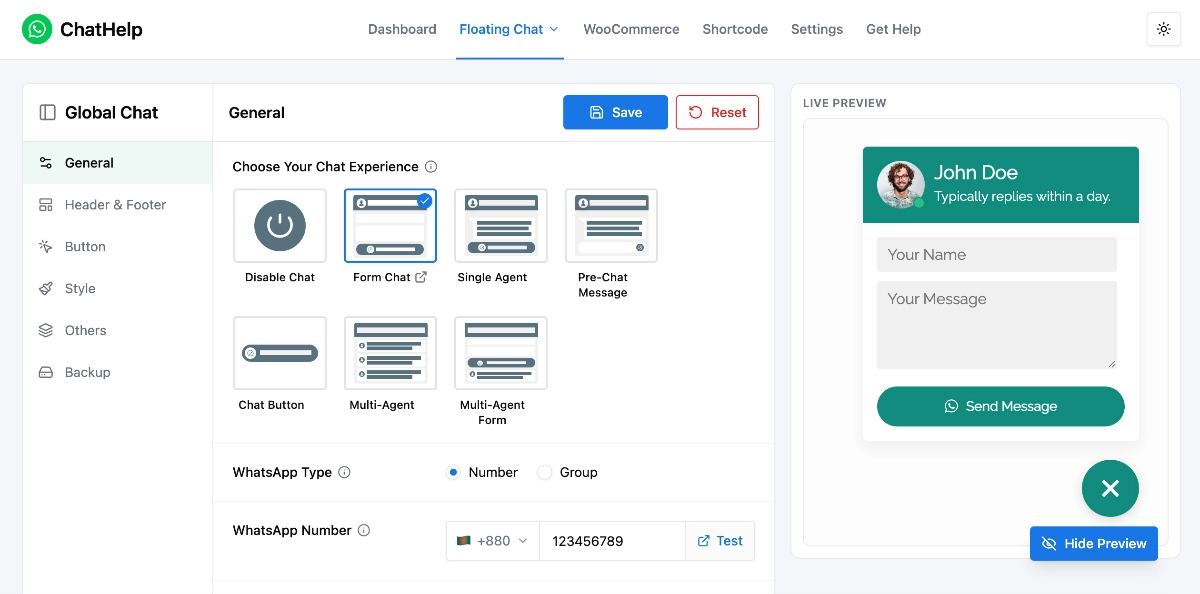
- A Live Admin Preview that renders your widget in real time as you edit its colors, text, layout, and behavior.
Alongside these headline features, 3.5.0 ships a long list of smaller improvements and fixes across the widgets, leads, and dashboard screens. We’ll walk through the important parts below, starting with the change that will save you the most time day to day. If you only read one section, make it the next one, because Global WhatsApp Defaults is the feature most site owners will feel every time they touch their settings.
Global WhatsApp Defaults: Set Once, Inherit Everywhere
If you’ve ever changed your WhatsApp number and then had to hunt through every WooCommerce page, shortcode, and layout to update it, this feature is for you. In 3.5.0, the WhatsApp Number and Group you set in Global Chat now act as defaults for the entire plugin. Anywhere a number or group is left empty, the plugin automatically falls back to your global value.
That inheritance applies across all the places you’d expect a WordPress WhatsApp chat plugin to appear:
- WooCommerce WhatsApp buttons on Shop, Product, Cart, Checkout, and Thank You pages
- The plugin shortcode
- The Elementor WhatsApp widget
- The Gutenberg block
- Any assigned Chat Layouts
The behavior is simple and predictable. Change the global number once, and every location that inherits it follows automatically. If you enter a value locally, that local value still wins and overrides the global default for that spot. Nothing is locked down: you get a sensible default with the freedom to override wherever you need something different.
A practical example
Say you run a WooCommerce store with a general support line that answers most customer questions. You want that number on your Shop page, your product pages, the cart, and the checkout, so shoppers can reach you at any stage. Before 3.5.0, you’d enter that number in each of those places individually, and updating it later meant repeating the work.
Now you set the support number once in Global Chat and leave the WooCommerce fields empty. Every WooCommerce WhatsApp button picks it up automatically. If one product line has a dedicated sales rep, you enter that rep’s number on that product only, and it overrides the global default there while every other page keeps using the main line. When the support number changes down the road, you update it in exactly one place and the whole store follows. For multi-location stores or teams that rotate numbers, that’s a real reduction in busywork and a smaller chance of a stale number slipping through.
The same logic applies to WhatsApp groups. If you route enquiries into a shared group so that any available team member can respond, set that group once as your global default and every inheriting location will use it. Should a seasonal campaign need its own dedicated group for a limited run, you assign that group to the relevant Chat Layout or block, and it takes precedence only where you set it. When the campaign ends, remove the local value and the location quietly falls back to your global group again.
The practical payoff is consistency. Because empty fields inherit rather than break, you’re far less likely to end up with a page that silently points customers at an old or wrong number. It also lowers the barrier for anyone maintaining the site who isn’t a WhatsApp Chat Help expert: they can update one global setting with confidence instead of auditing every button, shortcode, and layout across the store.
A Completely Redesigned Admin Panel
The most visible change in this release is the admin panel itself. We rebuilt the entire interface from the ground up with a modern, cleaner design: better layout, clearer navigation, more consistent spacing, and a more logical flow from one setting to the next. If you’ve used the plugin before, everything you rely on is still here, just easier to find and nicer to work in.
This wasn’t a coat of fresh paint over the old screens. Rebuilding from scratch let us fix long-standing layout quirks, tighten the spacing between controls, and group related settings so the path from opening the plugin to a finished configuration is shorter. The result is an admin that feels calmer and more predictable, which is exactly what you want when you’re setting up a customer-facing chat widget and don’t want to second-guess where a particular option lives.
Now powered by React
Under the hood, the admin is now built on React. In practice, that means the settings, widgets, leads, and dashboard screens behave like a single-page app rather than a series of full page reloads. Moving between sections is faster, your changes are tracked more reliably as you work, and the whole panel feels more responsive. The performance gains show up most when you’re configuring several things in a row and don’t want to wait for a reload after every click.
Built with shadcn/ui
We’ve integrated the shadcn/ui component library throughout the admin. This is the kind of change you feel more than you notice: buttons, form fields, tabs, and menus now share one consistent, modern design system. It also improves accessibility, so the interface works better with keyboard navigation and assistive technology. Consistency across screens means less time figuring out how a particular control behaves and more time getting your widget set up.
Live Admin Preview
The feature we’re most excited about is the Live Admin Preview. Your widget settings now render in a real-time preview pane as you edit them. Change a color, adjust the layout, rewrite the greeting text, or tweak the widget’s behavior, and you see the result instantly, without saving or reloading the page.
This matters most for non-technical users. Configuring a WhatsApp chat widget in WordPress used to involve a loop of change a setting, save, open the front end, check, and repeat. That trial-and-error cycle is gone. You can now dial in exactly how your widget looks and feels while you’re still in the settings screen, which makes the whole process faster and far less intimidating for anyone who isn’t comfortable jumping back and forth between the admin and the live site.
It also encourages experimentation. When trying a new accent color or a shorter greeting costs nothing more than a glance at the preview pane, you’re more likely to fine-tune the widget until it fits your brand properly rather than settling for the first setup that works. For agencies and freelancers configuring the plugin on behalf of clients, the preview doubles as a quick way to show a client what they’re getting before anything goes live.
Smaller Improvements & Fixes
Beyond the headline features, 3.5.0 includes a batch of refinements that make the admin more consistent and stable. Here’s what improved:
- Better responsive behavior across the admin, with layouts that adapt more gracefully on smaller screens.
- Improved navigation and settings organization for a more intuitive editing workflow.
- “Assign Layouts” is now a tab on the Chat Layouts page instead of a separate menu item, grouping all layout settings in one place.
- Shared navigation and layout across the Settings, Global Chat, and Chat Layout editor pages, so they all use the same section navigation, header, and structure.
- Numerous layout and usability refinements across the widgets, leads, and dashboard screens.
And here’s what we fixed:
- Various UI inconsistencies across the admin for better visual stability.
- Dark mode color and contrast issues on the Dashboard, the availability scheduler, and other admin screens.
- Missing or incorrect icons in the icon picker and section navigation after the bundled icon font update.
- Multiple bugs across the admin, along with general performance and reliability improvements.
How to Update
Installing the WhatsApp Chat Help plugin update takes a minute and requires no changes to your existing settings. You have two options:
- Update from your WordPress admin. Go to Plugins > Installed Plugins, find WhatsApp Chat Help, and click Update Now. If auto-updates are enabled, the update may already be waiting for you.
- Download from WordPress.org. Grab the latest package from the plugin page on WordPress.org and install it manually if you prefer.
As always, we recommend running a quick backup before updating any plugin. Once you’re on 3.5.0, open Global Chat to set your default WhatsApp number and group, then explore the redesigned panel and try the Live Admin Preview.
Frequently Asked Questions
Will the WhatsApp Chat Help plugin update change how my widget looks to visitors?
No. Version 3.5.0 focuses on the admin side of the plugin. The front-end WhatsApp chat widget your visitors interact with keeps working exactly as it did before, and your existing widget styling and settings carry over untouched.
Do I have to reconfigure my WhatsApp numbers after updating?
No. Any numbers and groups you already entered are preserved. Global WhatsApp Defaults are additive: they only fill in fields you leave empty. If every field already has a value, nothing changes until you decide to clear a field and let it inherit the global default instead.
Where did the “Assign Layouts” menu item go?
It’s now a tab on the Chat Layouts page rather than a separate menu item. All layout-related settings live in one place, so you assign layouts from the same screen where you create and edit them.
Does the React-based admin affect my site’s front-end performance?
No. React powers the admin interface only. It loads when you’re working inside the plugin’s settings, not on your public pages, so there’s no added weight for your visitors.
Key Takeaways
- The WhatsApp Chat Help plugin update 3.5.0 was released on 14 July 2026 and is the biggest admin change to the plugin so far.
- Global WhatsApp Defaults let you set your number and group once in Global Chat; every empty field across WooCommerce pages, the shortcode, the Elementor widget, the Gutenberg block, and Chat Layouts inherits it automatically, while local values still override.
- The admin panel was rebuilt from scratch with a cleaner design, React for a fast single-page experience, and the shadcn/ui component library for a consistent, accessible interface.
- The new Live Admin Preview renders widget changes in real time, so you can style your WhatsApp chat widget without saving or reloading.
- The release also improves responsive behavior and navigation, consolidates layout settings, and fixes dark mode, icon, and UI consistency issues.
- You can update straight from your WordPress admin or download the plugin from WordPress.org; existing settings are preserved.
Ready to try it? Install or update the free version of WhatsApp Chat Help from wordpress.org/plugins/chat-help, and if you want advanced features and priority support, upgrade to Pro at wpchathelp.com. Whether you’re a long-time user or evaluating the plugin for the first time, this is the ideal moment to jump in and experience the new admin. We’d love to hear what you think of the redesigned panel, the Global WhatsApp Defaults, and the new Live Admin Preview once you’ve had a chance to explore them.