


Picture your checkout as a physical store. Seven out of ten people fill a basket, walk to the till, then leave it there and go home. That’s the reality online: as of 2026, the Baymard Institute‘s meta-analysis of 50 separate studies puts the average cart abandonment rate at 70.22%.
The fix doesn’t have to be an expensive recovery suite. You can reduce cart abandonment with WhatsApp chat — a channel your customers already use every day — for the cost of a plugin. Because here’s the thing: WooCommerce cart abandonment usually isn’t rejection. It’s hesitation.
This guide covers why carts get abandoned, why WhatsApp beats a traditional live chat widget for small stores, seven tactics you can copy this week, and a step-by-step setup using the Chat Help plugin.
Key Takeaways
- The average online cart abandonment rate is 70.22%, per Baymard Institute’s 2026 meta-analysis of 50 studies.
- The top fixable causes are unexpected extra costs (48%) and forced account creation (26%) — both are doubts a quick conversation can resolve (Baymard).
- WhatsApp passed 3 billion monthly users in 2025 (Meta, Q1 2025 earnings call), so shoppers need no new app or account to reach you.
- You reduce cart abandonment with WhatsApp by being reachable at the moment of doubt — and unlike on-site live chat, the thread survives after the visitor closes the tab.
- The free Chat Help plugin adds WhatsApp chat to WooCommerce in about ten minutes; Pro adds product-aware buttons, lead forms, scheduling, and webhooks.
Table of Contents
Why Do Shoppers Abandon Their Carts in the First Place?
Mostly because something surprised or worried them at the last moment. In Baymard’s survey of US online shoppers, 48% of people who abandoned an order blamed unexpected extra costs like shipping and taxes. Another 26% quit because the site wanted them to create an account, and 18% gave up on a checkout that felt too long or complicated.
A further 43% say they were “just browsing.” You won’t win those, and that’s fine. The rest wanted the product and hit a snag. Baymard estimates that $260 billion in lost orders across the US and EU are recoverable through better checkout experiences alone.
Read that list again and notice a pattern. Almost every reason is a question nobody answered in time. What will shipping actually cost? Why do I need an account? Can I trust this site with my card? A thirty-second human conversation handles all three — which is something no exit popup or countdown timer can claim.
Why WhatsApp Chat Works to Reduce Cart Abandonment
Because it removes every barrier between a hesitant buyer and an answer. In 2025, WhatsApp passed 3 billion monthly users — a figure Mark Zuckerberg confirmed on Meta’s Q1 2025 earnings call. Your customer almost certainly has it installed, knows how it works, and trusts it with their family group chat.
So why WhatsApp instead of a regular live chat widget? Persistence. A visitor typing into an anonymous chat box gets impatient, closes the tab, and the conversation dies with it. A WhatsApp thread survives. They can leave your site, get on a bus, reply two hours later — and you still have the conversation and their number.
People already shop this way. Back in 2023, Meta reported 600 million daily chats between people and businesses across its platforms, and business messaging has only grown since. Meta’s own marketing materials claim open rates near 98% for WhatsApp messages. Take that exact figure with a grain of salt — it comes from Meta — but independent benchmarks still put message read rates several times higher than email’s typical 20%.
And for a small store, there’s nothing new to learn. You answer from the same WhatsApp app you already use, on your phone, between packing orders. No dashboard, no seat licenses, no “agent console.”
7 Ways to Reduce Cart Abandonment With WhatsApp Chat
These are ordered roughly by impact. You don’t need all seven on day one — the first two alone cover the biggest abandonment causes in Baymard’s data.
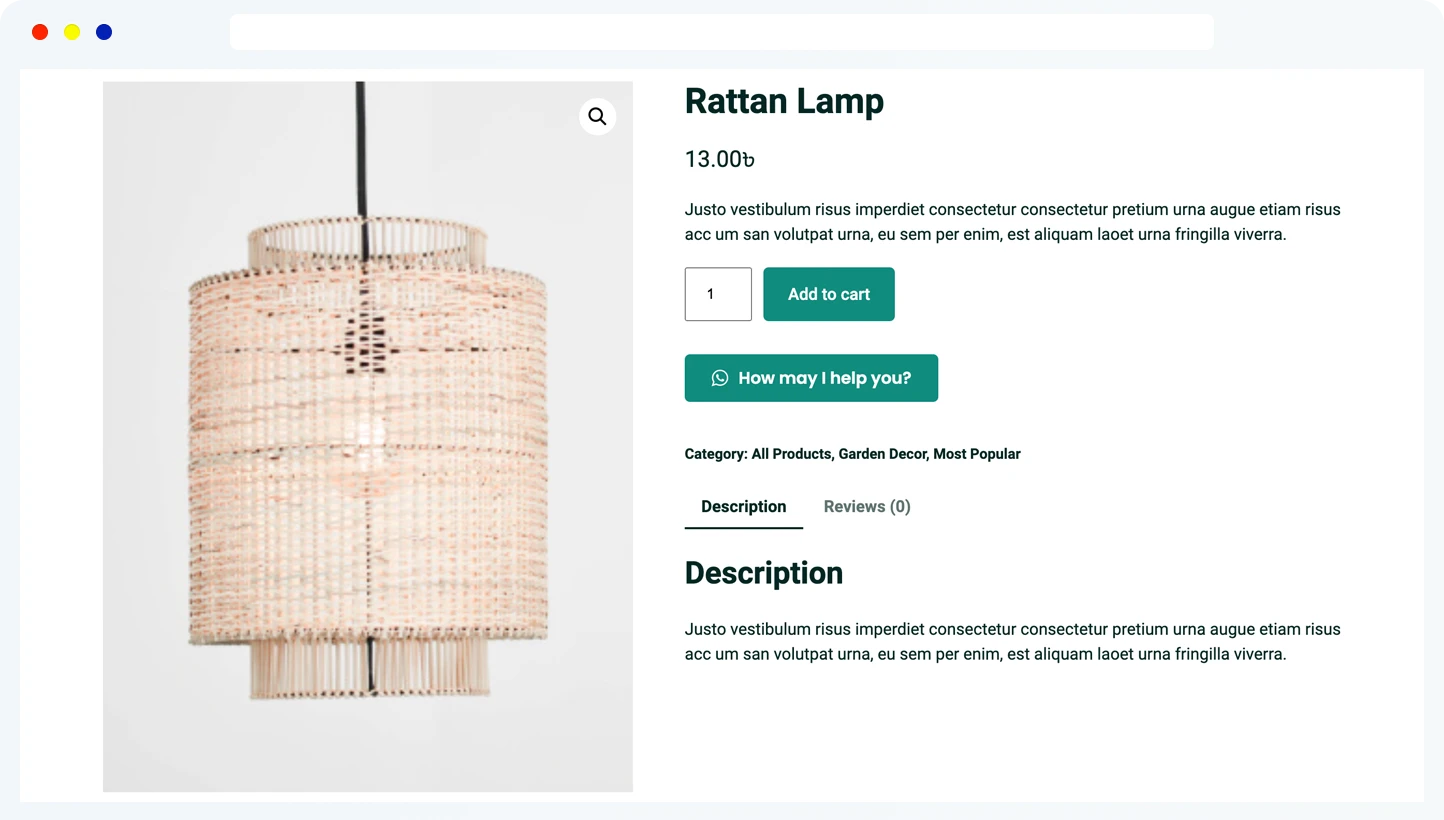
1. Put a WhatsApp button on every product page
Doubts are born on the product page, not at checkout. By the time someone abandons a cart, the unanswered question is often hours old. A product-page button catches it at the source.
With Chat Help‘s WooCommerce integration, the button pre-fills the message using dynamic tags — {productName}, {price}, and {sku} — so a single tap sends you something like: “Hi! Quick question about Aria Linen Dress ($89, SKU ALD-204).” You know exactly what they’re looking at, and they never have to explain context.
2. Answer the shipping-cost question before checkout
Unexpected costs drive 48% of abandonments, per Baymard. So invite the question early. Set your button’s default message to something like “Ask us what shipping costs to your area” and reply with the full landed total — product, shipping, taxes.
A shopper who already knows the total before checkout has nothing left to be surprised by. That’s the single biggest abandonment fix the research points to.
3. Capture the lead before the chat starts
Chat Help’s pre-chat form collects a name and contact details before WhatsApp opens. That gives you two wins. If the visitor bails before sending their message, you still have someone to follow up with. And when the chat does start, you can greet them by name.
Keep the form short — a name plus one contact field. Every extra field costs you conversations.
4. Only show chat when someone can actually answer
A chat message that sits unanswered for six hours does more damage than no chat at all. It confirms the shopper’s worst suspicion: nobody’s home.
Chat Help’s availability scheduling shows or hides the bubble based on your working hours and timezone, per agent. Outside those hours, show the lead form instead, so the question still lands in your inbox for a morning reply.
5. Add a rescue prompt on the cart and checkout pages
This is where hesitation peaks, so change the message to match. On the cart and checkout pages, use copy like “Stuck at checkout? Message us on WhatsApp — we reply in minutes.”
One warning from experience: check the bubble’s position on a phone. If it covers the Place Order button at 375px width, you’ve built an abandonment machine, not a rescue line.
6. Follow up on conversations that stall
Here’s the part most stores skip. Someone asks about sizing, you answer, then silence. Sound familiar? Because the WhatsApp thread persists, you can send one polite nudge: “Hi Maria — the medium is back in stock, and it ships tomorrow if ordered by 3pm.”
In my experience the follow-up recovers more orders than the first reply. People get distracted, not disinterested. One nudge, same day or next morning — it’s a reply to their question, not a marketing broadcast, so keep the tone that way.
7. Pipe every conversation into a follow-up list with webhooks
Chat Help can fire a webhook on every form submission and button click, sending the visitor’s details and the product they asked about to Google Sheets, your CRM, or an automation tool. That becomes your follow-up queue.
It doubles as product research, too. If one product generates half your questions, its page copy is missing something — fix the page and you prevent the doubt entirely.
How to Set Up WhatsApp Chat for WooCommerce With Chat Help
The basic setup takes about six minutes. If you can install a plugin, you can do this — no code involved.
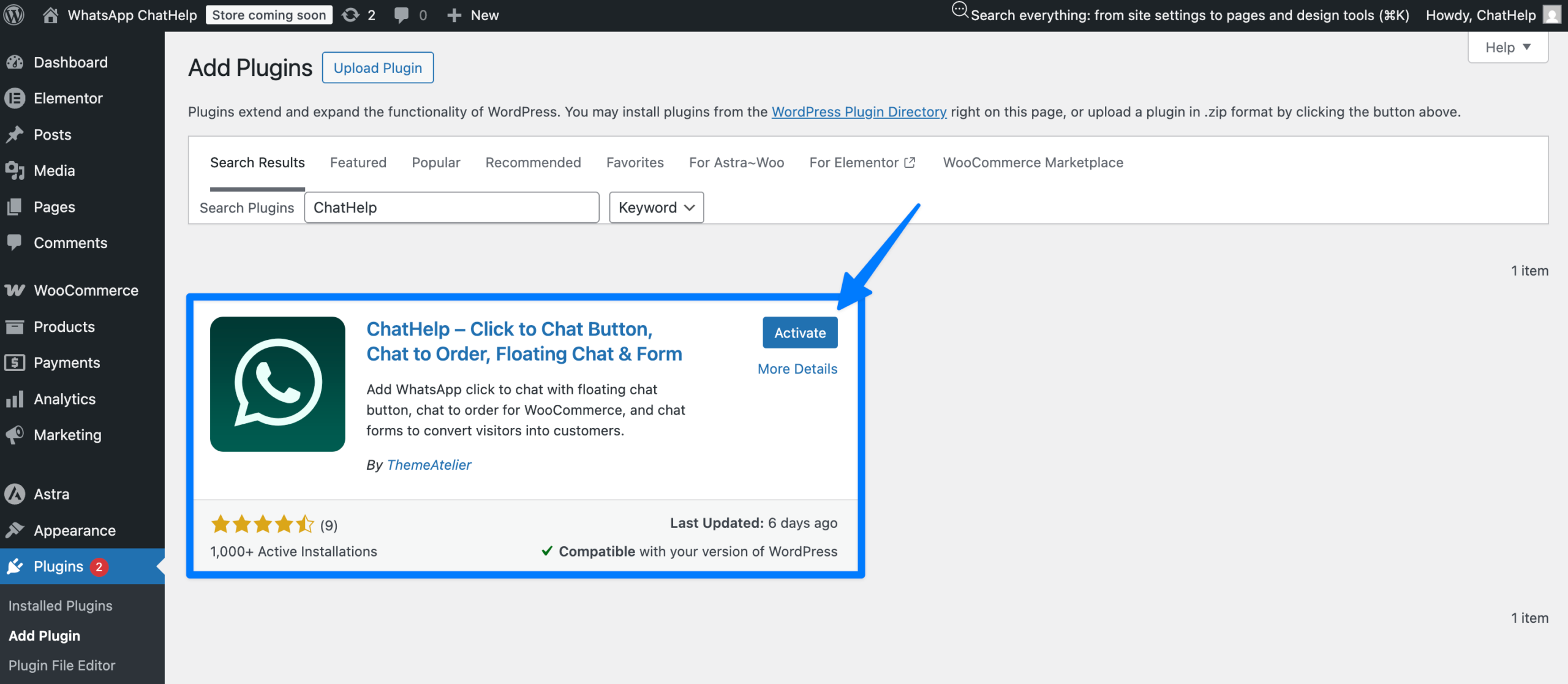
Step 1: Install the free plugin
In your WordPress dashboard, go to Plugins → Add New and search for “Chat Help,” or grab it from the WordPress.org plugin directory. Install and activate. The free version includes the floating WhatsApp bubble, buttons, and shortcodes.
Step 2: Add your WhatsApp number and default message
Enter your number with the country code (for example, +1 555 013 0199) — personal WhatsApp, WhatsApp Business, and group links all work. Then write the default pre-filled message. Make it an invitation to ask, not a generic “Hello.”
Step 3: Position and style the bubble
Pick a corner, match your brand color, and set different placements for desktop and mobile. Then load your checkout on a phone and confirm the bubble doesn’t overlap any button a buyer needs to press.
Step 4: Turn on the WooCommerce product button
This is the Pro feature that makes chat product-aware (plans here). Enable the product-page button and set a message template such as: “Hi! I’m interested in {productName} ({price}, SKU {sku}) — is it in stock?” Every incoming chat now identifies its product automatically, and you can show different buttons per device.
Step 5: Add the pre-chat form
Enable the lead form and keep it to two fields: name and email or phone. The form data can be merged into the WhatsApp message template, so the conversation starts with everything you need.
Step 6: Set your availability hours
Configure your schedule and timezone so the bubble appears only when you (or an agent) can respond. If you add team members later, each agent gets their own availability window.
Step 7 (optional): Connect a webhook
Point the webhook at Google Sheets, your CRM, or an automation platform to log every lead and chat click. This is what makes measurement possible later.
Now test it like a customer would: open a product page on your phone, tap the button, and check that WhatsApp opens with the product name, price, and SKU already filled in. If it does, you’re live.
How Do You Measure Whether It’s Working?
You can’t tell whether you’ve managed to reduce cart abandonment with WhatsApp unless you know your starting point, so grab a baseline before you change anything. In WooCommerce Analytics or GA4, compare sessions that added to cart against completed orders over the last 30 days — that’s your abandonment rate. Write it down.
Then track three numbers. First, chat volume: webhook logs or button-click events tell you how many conversations start. Second, recovered orders: the simplest attribution is a small coupon code you only share inside chat — every order using it came from a conversation. Third, your response time, because slow replies quietly kill the whole system.
Is it worth the effort? Run your own numbers. A store with 1,000 carts a month at a 70% abandonment rate loses 700 orders. Recover just 3% of those and you’ve gained 21 orders — at a $60 average order value, that’s $1,260 a month from a plugin and a phone you already own.
Reduce Cart Abandonment with WhatsApp FAQ
Can you really reduce cart abandonment with WhatsApp chat?
Yes, because it attacks the causes directly. Baymard’s research shows 48% of abandonments come from unexpected costs and 26% from forced account creation — both are doubts a live conversation resolves in seconds. WhatsApp also outperforms site-only chat because the thread survives after the visitor leaves your store, so stalled conversations can still become orders.
How do I add a WhatsApp chat button to WooCommerce product pages?
Install a click-to-chat plugin like Chat Help, add your WhatsApp number, and enable its WooCommerce product button. Dynamic tags such as {productName}, {price}, and {sku} pre-fill the shopper’s message with the exact product they’re viewing, so every conversation starts with full context and no typing.
Is there a free WhatsApp chat plugin for WordPress?
Yes. Chat Help has a free version on WordPress.org with a floating WhatsApp bubble, buttons, and shortcodes. The Pro version adds the WooCommerce product-page button with dynamic tags, pre-chat lead forms, availability scheduling, multi-agent support, and webhook integrations.
What is a good cart abandonment rate for WooCommerce?
The documented average across 50 studies is 70.22% (Baymard Institute, 2026). If your WooCommerce store sits below 65%, you’re doing better than most. Product type, price point, and traffic sources move the number a lot, so track your own month-over-month trend rather than chasing the benchmark.
Can I send automated abandoned cart messages on WhatsApp?
Automated outbound recovery messages require the WhatsApp Business API, approved message templates, and explicit customer opt-in. For small stores, click-to-chat is the simpler route: the customer starts the conversation, so those requirements don’t apply, and you can follow up manually inside the same thread.
Start Rescuing Carts This Week
You don’t need an enterprise recovery suite to reduce cart abandonment with WhatsApp. You need to be reachable at the exact moment a shopper hesitates — with the product context already in hand and a real human on the other end.
Install the free plugin today, get the bubble live, and add the product-page button once you see the first conversations come in. The 70% of shoppers who walk away aren’t gone. Most of them are one unanswered question from buying.