Black Friday Sale: up to 80% off every Pro plan

Ends Dec 15 at 6:59 pm EST. See pricing

WhatsApp Simple Button for WordPress

A floating button with the WhatsApp icon and your own words, such as “Chat with us”. Clear, compact and in the free version.

The button in the bottom corner of this page is the real Chat Help plugin with the Simple Button style. It opens WhatsApp directly.

The Simple style, made with the shortcode

The button in the corner of this page is live too.

How it works

What visitors see

  • Icon and label

    The WhatsApp icon with a short label beside it.

  • Your style

    Background, label and icon colours with hover colours, border, radius and padding.

  • A ready message

    A pre-filled message with variables such as the page title or URL.

What you can change in the WhatsApp simple button

  • Button label
  • Pre-filled message with variables
  • Background, label and icon colours, with hover
  • Icon background on or off
  • Border, radius and padding
  • Tooltip and notification badge

Use cases

Who it is for

  • A clear call to action

    A label such as “Questions? Chat with us” says what the button does.

  • Shops

    “Order on WhatsApp” or “Ask about delivery” next to the icon.

  • Your language

    Write the label in the language of your site.

Compare

Which layout fits?

All layouts at a glance. Switch a chat to another layout at any time.

Form ChatSingle AgentPre-Chat MessageChat ButtonThis pageMulti-Agent List / GridMulti-Agent Form
Opens a chat window firstIncludedIncludedIncludedNot includedIncludedIncluded
Several people, each with their own numberNot includedNot includedNot includedNot includedIncludedIncluded
A form before the chatIncludedNot includedNot includedNot includedNot includedIncluded
Visitor types the question in the windowNot includedNot includedIncludedNot includedNot includedNot included
Saves leads in WordPressIncludedNot includedIncludedNot includedNot includedIncluded
In the free versionIncludedIncludedIncludedIncludedNot includedNot included

Set up

Set up the WhatsApp simple button in three steps

  1. Add a chat

    Go to Chat Help → Add Chat, give it a title, choose the layout and enter your WhatsApp number or group link.

  2. Choose Simple Button

    Under Floating Button pick the Simple Button style and write the label.

  3. Choose where it shows

    Publish it and assign it to pages, posts or products, or set it up as the Global Chat for the whole site.
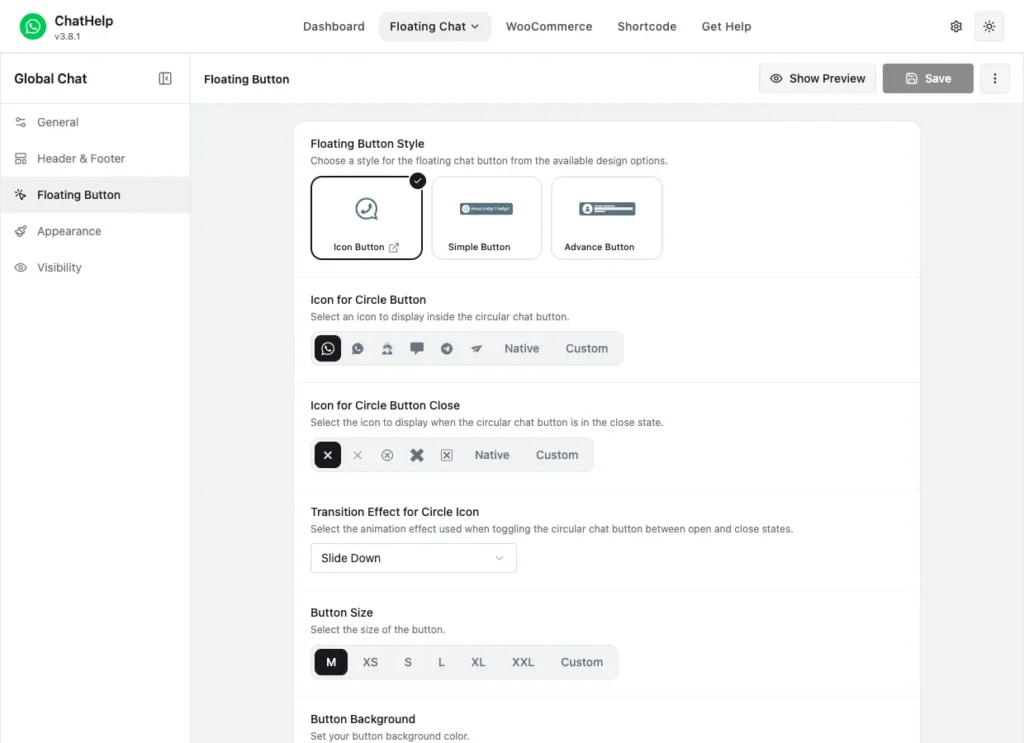
Simple Button settings: The Floating Button tab of the Global Chat
Style, label, colours, tooltip and badge are in the Floating Button tab of each chat.

Step-by-step: Floating button · Button styling

Video

Watch how it works

Add WhatsApp chat to WordPress: complete Chat Help setup guide · Watch on YouTube (opens in a new tab)

From WordPress.org

What users say

  • The plugin works perfectly and the team is very professional. I purchased the Pro version and the experience has been excellent. The plugin works perfectly and the team is very professional. I requested a couple of new features and they developed them without any issues and in a short time.

    uomiguel (opens in a new tab) on WordPress.org
  • Awesome Plugin for WhatsApp Floating Chat & WooCommerce Order. This plugin worked great for my website, Order Via WhatsApp. It also provides a floating chat icon, which is helpful as well.

    mohsinworld (opens in a new tab) on WordPress.org
  • Effective for WhatsApp Chat Support! I am using this plugin to provide support to my customers through WhatsApp. It’s really effective and they can connect with me very easily using their WhatsApp. They don’t need to save our number manually.

    firststepstogether (opens in a new tab) on WordPress.org

Read all reviews on WordPress.org (opens in a new tab)

Questions about the WhatsApp simple button

Yes.

Yes. Make a Custom Chat for each label and assign each one to its pages.

Yes. Turn the icon background off for a flatter look.

Turn visitors into WhatsApp conversations

Start free from WordPress.org. Upgrade to Pro for team chat with several agents, the Advance button, dark mode, unlimited form fields, visibility rules and webhooks.

Chat with usNeed Help? Chat with us (opens in a new tab)