



If you’re a small business owner still trying to grow through paid ads and one-off transactions, you’re fighting an uphill battle with a butter knife. The real edge in 2026 is community. Not the vague, feel-good kind — the kind that drives revenue, loyalty, and word-of-mouth that no ad budget can buy.This guide breaks down everything you need to know about online communities for small businesses: why they matter, how to build one that actually works, which platforms to use, and how tools like ZenCommunity are changing the game for entrepreneurs who are done playing small.
Table of Contents
Why Online Communities Are No Longer Optional for Small Businesses
Let’s talk numbers first.
In 2026, there are over 33.3 million small businesses in the United States alone — every single one competing for attention in an increasingly crowded digital world. The ones cutting through the noise aren’t necessarily the ones with the biggest ad spend. They’re the ones with the most engaged communities.
Studies show that customers spend 19% more with a company after joining its online community. Read that again. A 19% lift in spend not from a new product launch or a flash sale, but simply from belonging.
And it doesn’t stop at revenue. 66% of professionals report their communities have positively impacted customer retention, while 68% cite success in generating new leads.
Over 70% of businesses report improved customer loyalty by participating in an online business community.
For small businesses, this isn’t a “nice to have.” It’s the difference between chasing customers and attracting them.
What Exactly Is an Online Communities for Small Businesses?
An online community for a small business is a dedicated digital space where your customers, fans, and prospects connect — with each other and with you. It’s not a Facebook page where you post product updates. It’s not a Slack group where crickets echo at 2pm on a Tuesday.
It’s a living ecosystem built around shared interests, shared goals, or shared identity. Think:
- A bakery owner creating a members-only group for baking enthusiasts who love their products
- A fitness coach building a private community where clients track progress, share wins, and hold each other accountable
- A SaaS startup hosting a customer community to reduce support tickets and co-create features
- A local boutique launching a digital VIP club for repeat buyers
The common thread: belonging drives behavior. When people feel part of something, they buy more, refer more, and leave less.
The Business Case: Hard Data You Can’t Ignore
| Metric | Impact |
| Community professionals who believe it’s critical to the company’s mission | +19% to 21% |
| Businesses reporting improved customer loyalty | 81%+ |
| Community-influenced revenue (branded communities) | 30%+ of total revenue |
| Customer spending increases after joining a community | 88% |
| Customer retention improvement reported by professionals | 66% |
| Community professionals who believe it’s critical to company’s mission | 68% |
| Branded community ownership among businesses | 60% of companies |
| Small companies with an online community | Only 50% |
That last number is the opportunity: only 50% of small companies have an online community — while 60% of businesses overall own a branded online community. Small businesses are behind. Which means there’s a massive first-mover advantage sitting on the table for those willing to move now.
Types of Online Communities That Work for Small Businesses
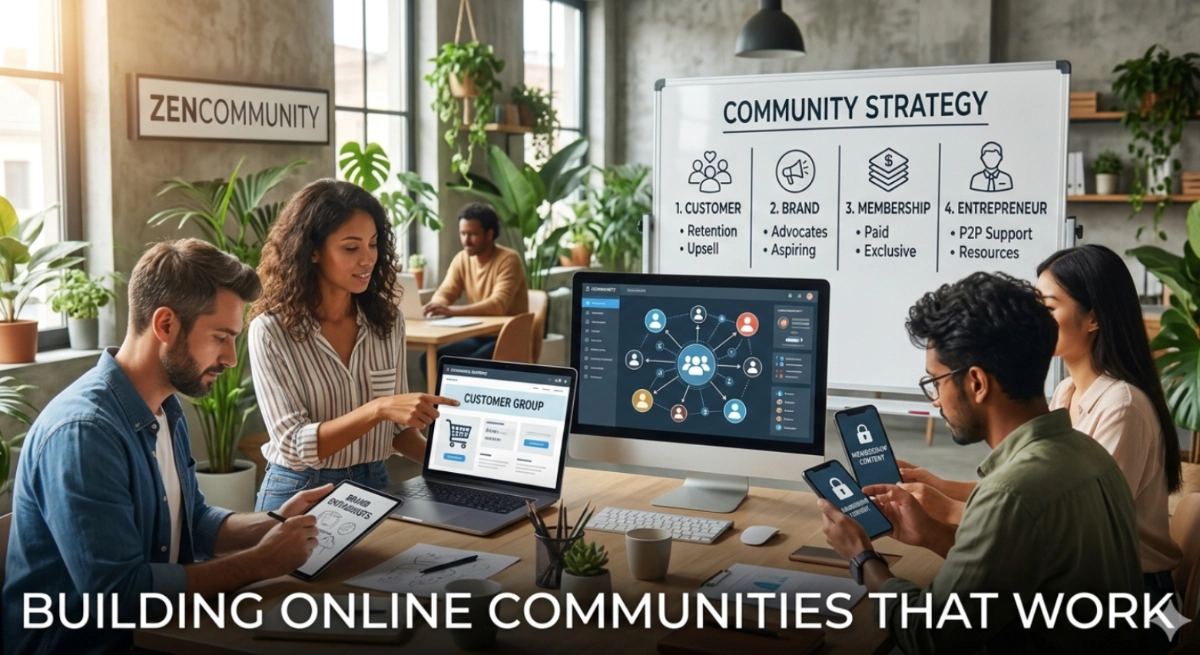
Not every community format suits every business. Here’s how to match the model to your goals:
1. Customer Communities
Built for existing customers. The goal is retention, upsell, and peer-to-peer support. Think: a private group where your customers can ask questions, share results, and connect with others who bought the same product or service.
Best for: E-commerce, SaaS, coaching, wellness brands
2. Brand Communities
Wider than a customer base — open to enthusiasts, advocates, and aspiring members who haven’t bought yet. Apple has one. Harley Davidson built an empire on one. Your small business can do the same at a micro-level.
Best for: Lifestyle brands, creators, local businesses with a cultural identity
3. Membership Communities
Paid access to exclusive content, events, and connections. This model generates predictable monthly revenue while deepening customer relationships. Subscription-based offerings are spreading to coaching, wellness, education, retail, and creative services — offering predictable revenue and deeper customer relationships.
Best for: Educators, coaches, consultants, curators
4. Digital Communities for Entrepreneurs
Peer-to-peer communities where small business owners support each other, share resources, and navigate the chaos together. These are high-value because the ROI is mutual — you grow alongside your members.Best for: B2B service providers, business coaches, industry-specific networks
How to Build an Online Community for Your Small Business (Step by Step)
Step 1: Define Your Community’s Core Purpose
Before you pick a platform or write a welcome message, answer this: why would someone show up here? Your community needs a magnetic reason to exist. Not “to connect customers” that’s weak. Try: “to help independent bakers turn their passion into a profitable home business.”
Specificity is magnetic. Vagueness is repellent.
Step 2: Choose Your Platform Wisely
The platform is the container, not the community — but choosing wrong can kill momentum. Here’s a quick breakdown:
| Platform | Best For | Limitation |
| Facebook Groups | Broad reach, low barrier | Algorithm limits reach; you don’t own the data |
| Slack / Discord | Real-time, informal conversation | Poor structure for content libraries |
| LinkedIn Groups | B2B networking, thought leadership | Low organic engagement |
| Circle / Mighty Networks | Structured, brandable communities | Learning curve for members |
| Chat Help (WhatsApp Plugin) | Instant customer communication, lead generation | Not a full community platform (works best alongside one) |
| ZenCommunity | All-in-one for small businesses | Built specifically for business owners |
ZenCommunity is worth a closer look if you’re a small business owner who wants the power of a full community platform without the enterprise price tag or the tech headache. It combines the structure of Circle with the ease of use your members actually need — designed for people who are running businesses, not managing servers.
Step 3: Seed Your Community Before You Launch
A ghost town is worse than no town. Before your community opens, recruit 10–20 “founding members” — loyal customers, collaborators, or advocates — who’ll make the first conversations feel alive. Invite them early, give them exclusive status, and let them shape the culture.
Step 4: Establish Clear Community Guidelines
Culture is either designed or defaulted. Without guidelines, communities drift toward noise, negativity, or silence. Set the tone early: what’s celebrated here, what’s not tolerated, and how members are expected to show up.
Step 5: Commit to Consistent Engagement
55% of community professionals report that consistently engaging members is one of their biggest challenges. The fix? Build engagement into your weekly rhythm. Host live sessions, post discussion prompts, celebrate member wins, and show up in the comments. Communities don’t grow on autopilot — at least not in the beginning.
Step 6: Measure What Matters
Track engagement rate (not just member count), content contributions, event attendance, and — critically — revenue influenced by community members. Over 30% of an organization’s revenue is influenced by their branded online community. Know your number.
Small Business Engagement: The Secret to Keeping Members Active
Here’s the counterintuitive truth about community building for businesses: the bigger the community isn’t always the better the community. Recent trends show movement toward smaller, specialized, trusted groups rather than massive open forums — people increasingly value quality interactions over quantity.
What keeps members engaged:
- Consistent value delivery — every time they show up, they get something useful
- Peer connection — relationships with other members, not just access to you
- Recognition — people stay where they feel seen
- Progression — clear pathways from newcomer to power member
Exclusivity — what happens here can’t happen anywhere else
Private Online Communities vs. Public Social Media Groups: What’s the Difference?
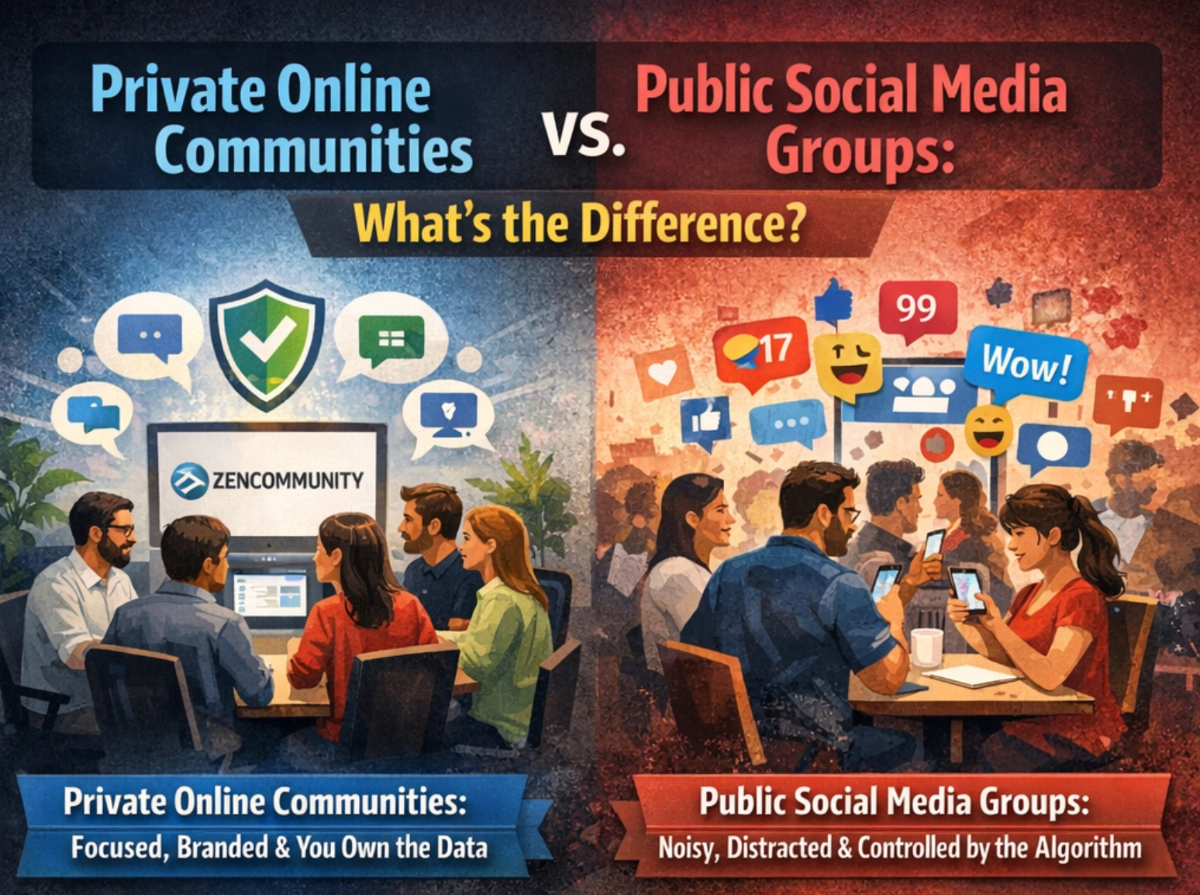
This is where many small businesses go wrong. They create a public Facebook Group, post a few times, wonder why engagement tanks, and conclude “community doesn’t work for us.”
Public social media groups are noisy, distracted spaces where the algorithm decides who sees your content. Private online communities are focused, branded environments where you set the rules and you own the data.
The ROI difference is stark. Advanced communities generate 67% more value via customer loyalty, customer retention, and word-of-mouth than basic community setups.If you’re serious about community building for your business, you need a dedicated platform — and ZenCommunity is built precisely for small businesses ready to make that move from scattered social media to a focused, owned community space.
The 2026 Community Trends Shaping Small Business Growth
AI-powered moderation tools now keep discussions safe and productive, while seamless integration with business software creates smoother workflows and better data sharing.
What’s rising in 2026:
- AI-assisted community management — automated welcoming, content recommendations, and engagement nudges
- Hybrid communities — blending online spaces with in-person events, pop-ups, and local meetups
- Paid membership tiers — free entry, premium access, VIP experiences layered in one community
- Community-led growth — where your members become your best salespeople through authentic advocacy
- Micro-communities — hyper-niche spaces built around very specific identities and interests
In 2026, small brands that invest in community-building — through newsletters, events, collaborations, or online spaces — will see stronger customer loyalty and organic marketing. Community becomes a strategic advantage, not a side effort.
How ZenCommunity Helps Small Businesses Win
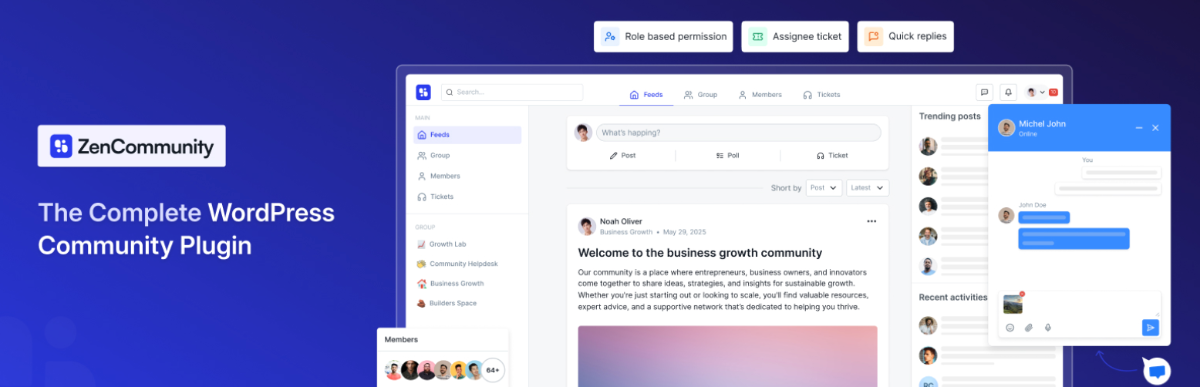
Building a community is one thing. Building one that grows, retains members, and drives revenue is another — and that’s exactly the gap ZenCommunity is designed to close.
Unlike generic platforms built for enterprise brands with full-time community teams, ZenCommunity is engineered for the reality of small business ownership: limited time, limited resources, and unlimited ambition. It gives you:
- A branded, private community space you fully own
- Easy member onboarding without the tech overwhelm
- Built-in engagement tools — discussions, events, content libraries
- Monetization features for membership tiers and paid access
- Analytics to track engagement, growth, and revenue impact
You’re not just getting a platform. You’re getting the infrastructure to turn your audience into an asset.
How to Build an Online Community (with ZenCommunity)
Below is a complete step-by-step guide on how to create a community in WordPress using the ZenCommunity plugin.
Step 1: Install the Plugin
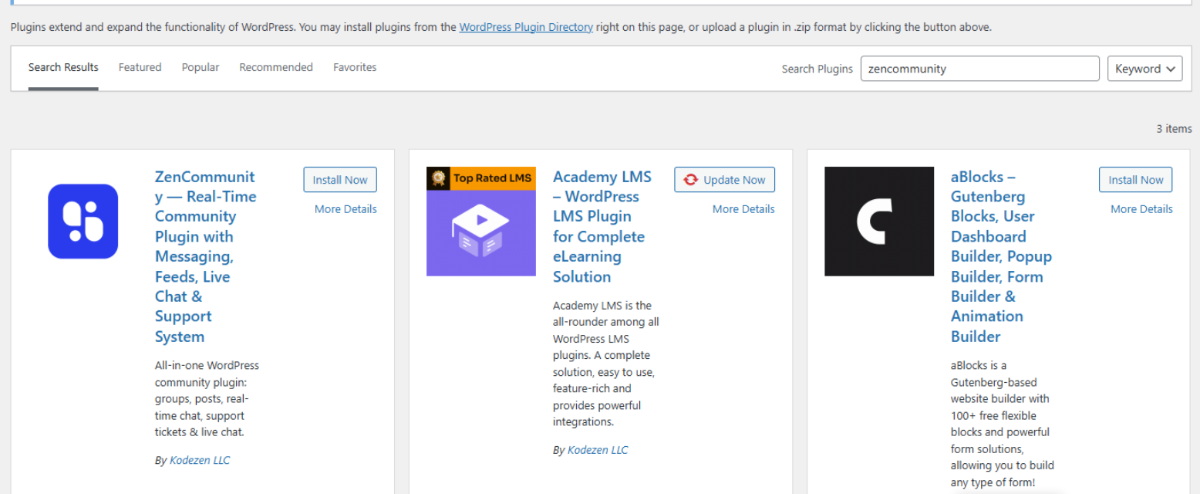
- Go to your WordPress Dashboard → Plugins → Add New.
- In the search bar, type “zencommunity”.
You will find ZenCommunity — Real-Time Community Plugin. - Click “Install Now”, then click “Activate”.
Step 2: Visit the Community from Frontend
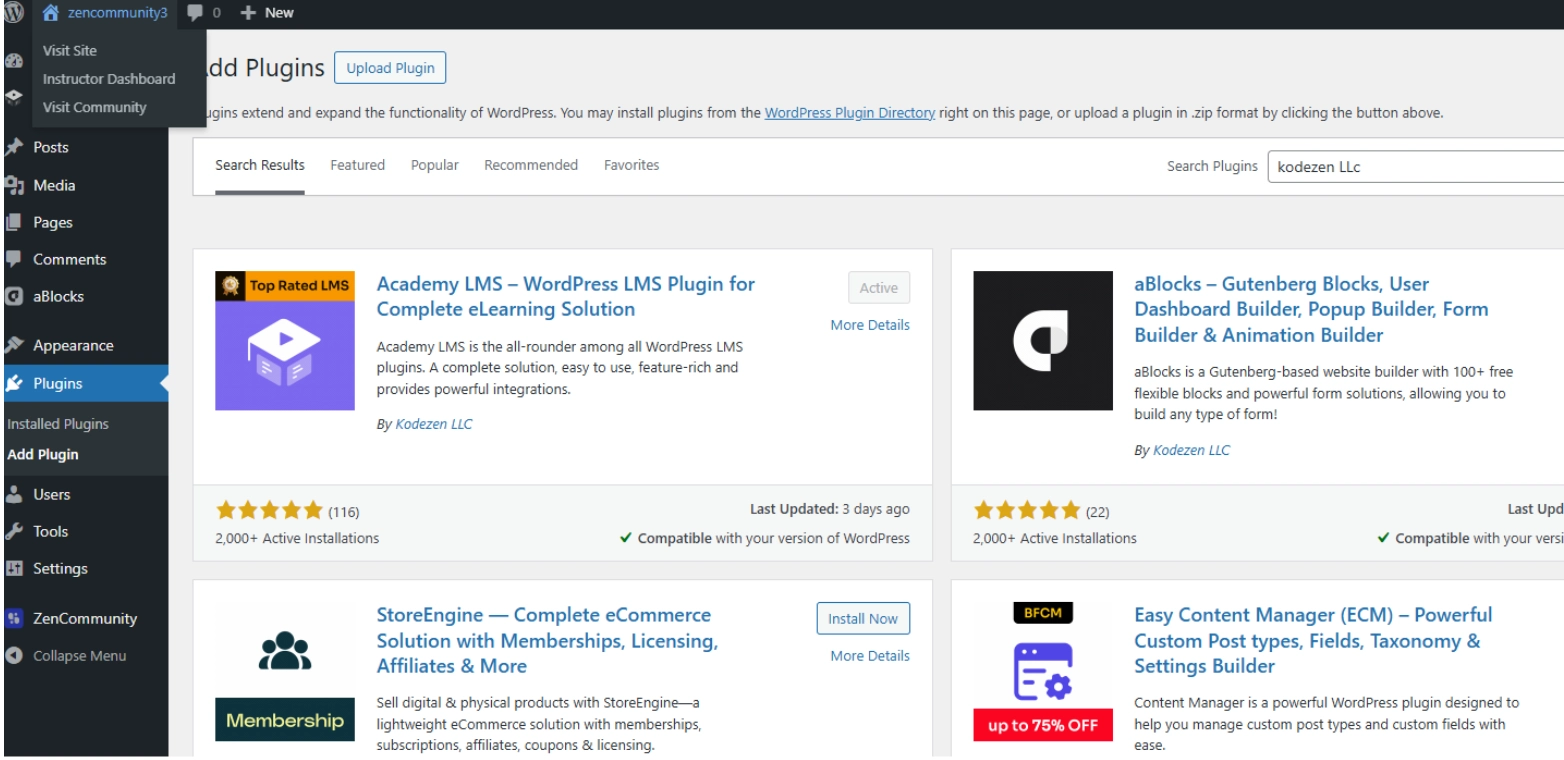
From the top Admin Bar of your WordPress site, click on your site name (e.g., “Test”).
A dropdown menu will appear with options like:
- Dashboard
- Plugins
- Instructor Dashboard
- Visit Community
- Themes
Click on “Visit Community” to directly access your ZenCommunity frontend page.
Step 3:Start Creating a New Group
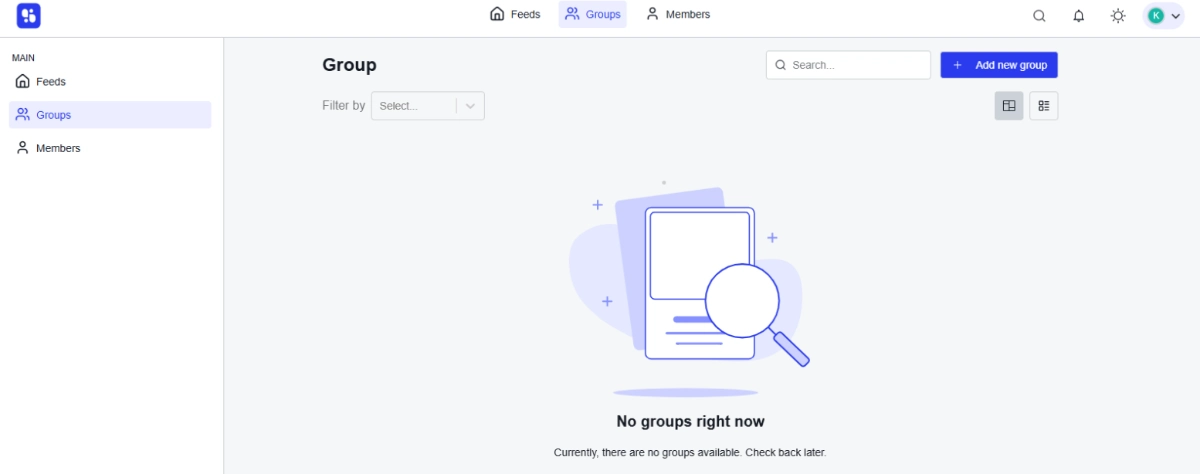
After activating the plugin, the ZenCommunity frontend will appear on your site.
At the top, you will see menus like:
- Feeds
- Groups
- Members
Click on Groups.
At first, you will see “No groups right now” — this is completely normal.
Step 4: Start Creating a New Group
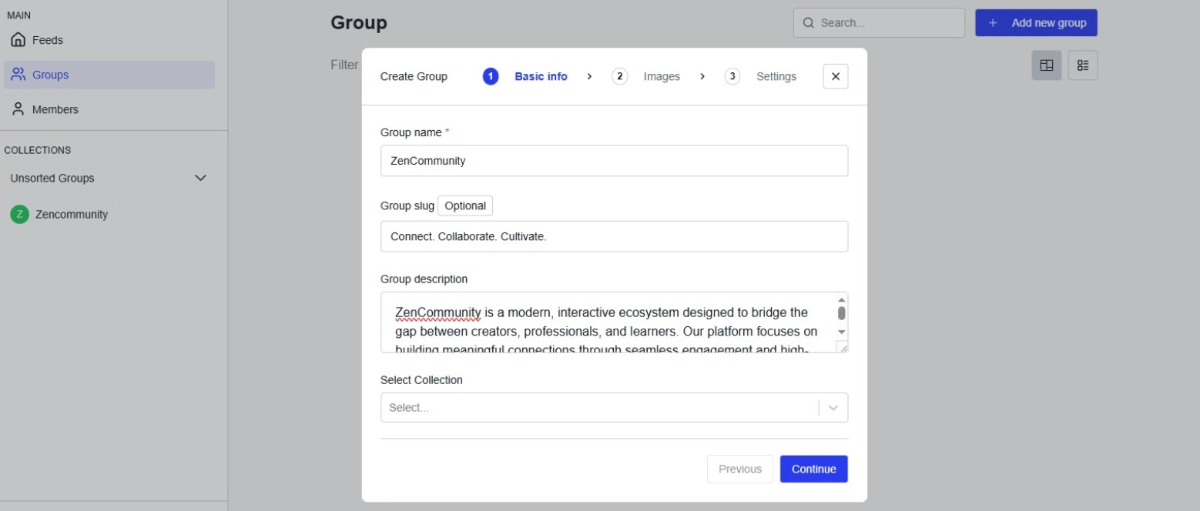
Click on the “+ Add New Group” button at the top right.
A popup titled “Create Group” will appear with 3 steps:
Step 1 — Basic Info:
- Enter Group Name (e.g., ZenCommunity)
- Add Group Slug (optional)
- Write a Group Description
- Select a Collection (optional)
Click “Continue”.
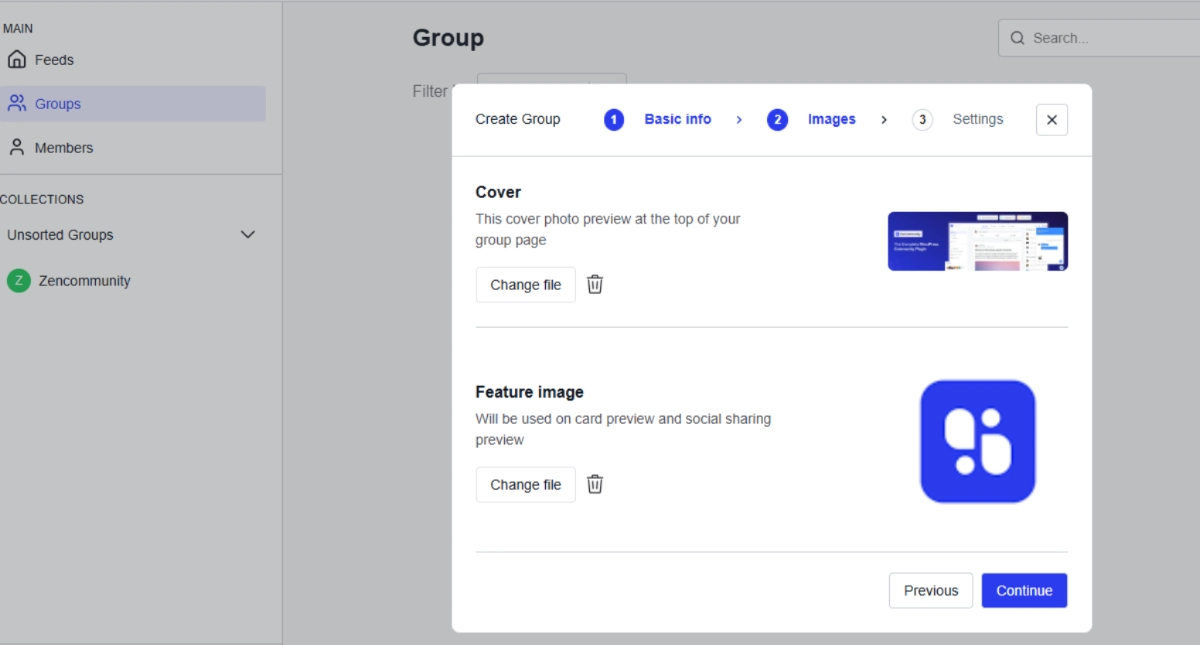
- Upload a Cover Photo (Size: 1020×320 pixels)
- Upload a Feature Image (Size: 320×180 pixels)
Click “Continue”.
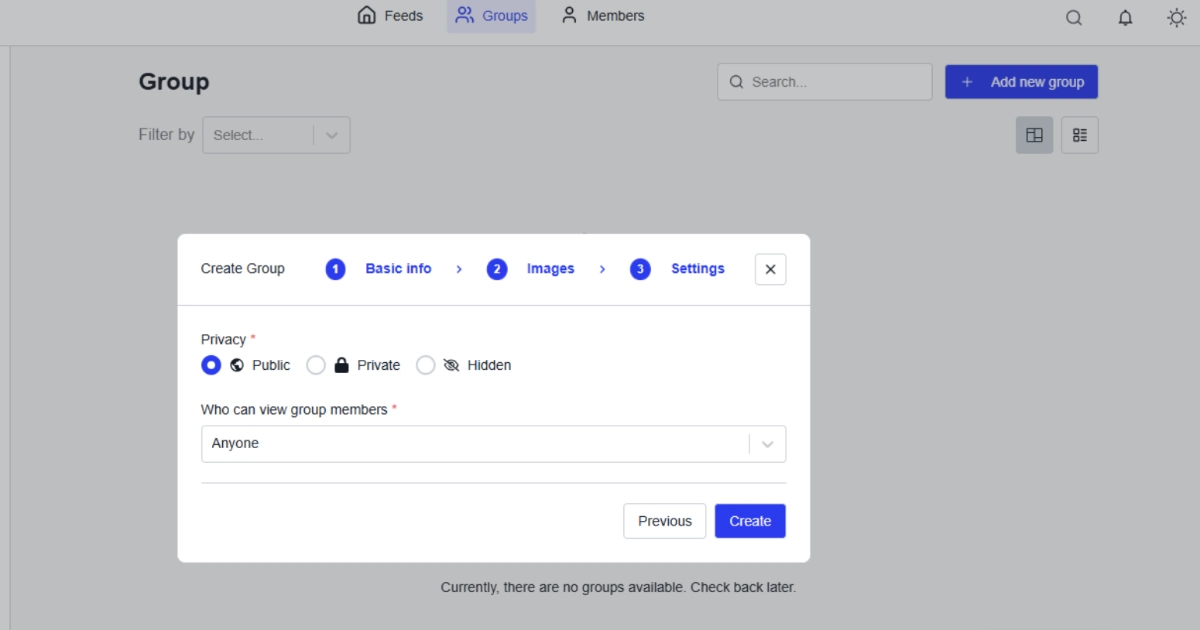
Step 3 — Settings:
Choose the Privacy Type:
- 🌐 Public — Anyone can view
- 🔒 Private — Only members can access
- 👁️ Hidden — Completely hidden
Set “Who can view group members”:
- Anyone
- Members
Click “Create”.
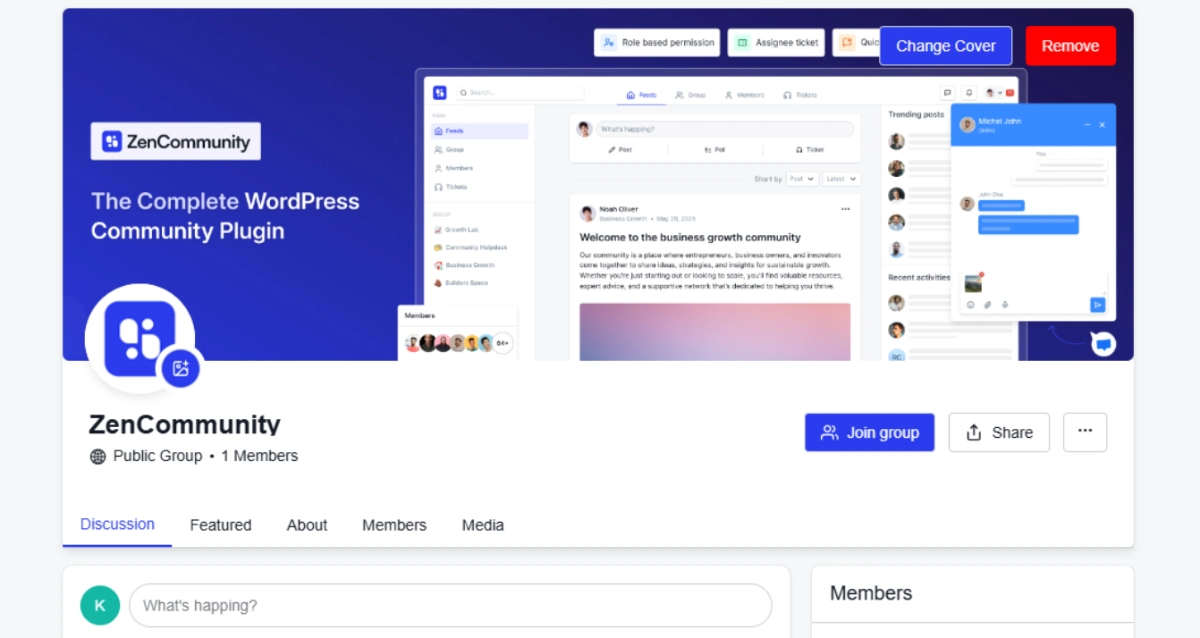
Step 5 : Group Created Successfully!
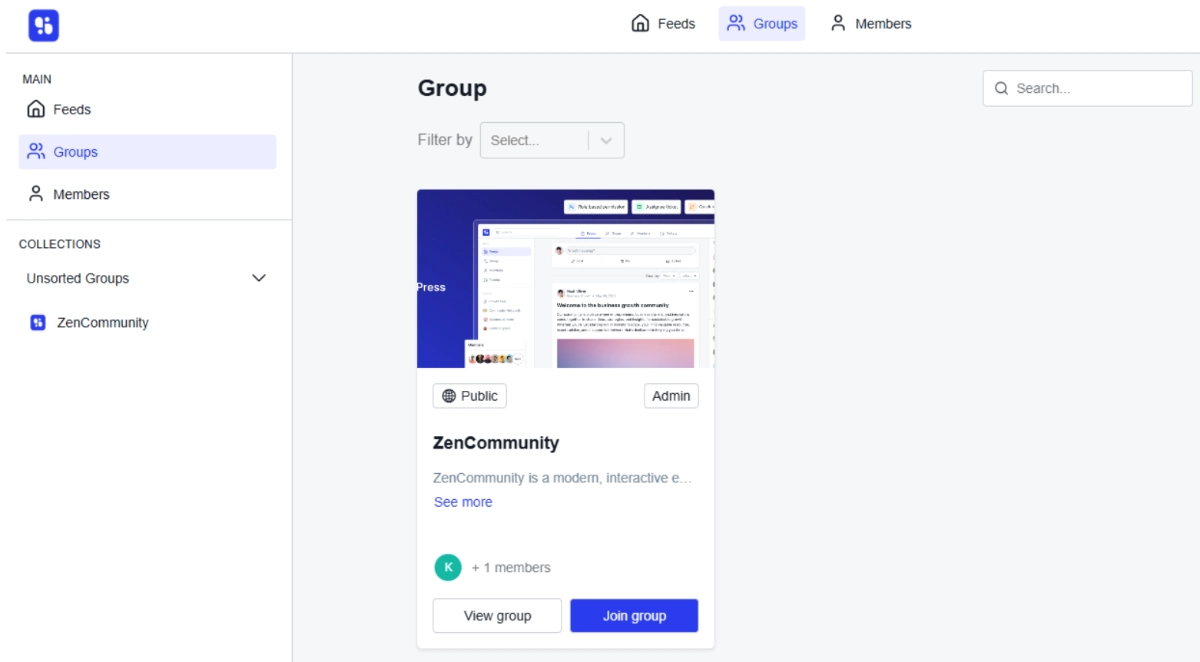
Once the group is created, it will appear on the Groups page as a card showing:
- Public/Private badge
- Member count
“View Group” and “Join Group” buttons
Conclusion: The Community Advantage Is Real — and It’s Available to You
Here’s the bottom line: the small businesses thriving in 2026 aren’t the ones who figured out the perfect ad formula. They’re the ones who stopped renting attention from platforms and started building audiences they actually own.
The online community software market stood at $2.1 billion in 2024 and is expected to reach $33.3 billion by 2032 — driven by businesses just like yours discovering that community isn’t a marketing tactic, it’s a business model.
You don’t need a massive team or an enterprise budget. You need the right platform, a clear purpose, and the commitment to show up for your people.
ZenCommunity is where small businesses go when they’re ready to make that shift — from chasing customers to building a community that brings them to you.
The question isn’t whether you should build an online community. It’s how long you can afford to wait.
Frequently Asked Questions
What is the best online community platform for small businesses?
The best platform depends on your goals — but for small businesses wanting full ownership, branding, and monetization in one place, dedicated platforms like ZenCommunity outperform generic social media groups. They offer structured spaces, member management, and engagement analytics that Facebook or Slack simply don’t provide.
How do online communities help small businesses grow?
Online communities drive growth through three core mechanisms: retention (members who stay longer), referral (engaged members refer others naturally), and revenue expansion (community members spend more). Customers spend 19% to 21% more with a business after joining its online community.
How much does it cost to build an online community for a small business?
Costs range from free (using Facebook Groups) to $50–$500/month for dedicated platforms, depending on features and member count. The ROI, however, tends to dramatically outpace the investment — especially when community activity begins influencing purchasing decisions.
What is a brand community for small businesses?
A brand community is a group of customers, fans, and prospects connected by shared affinity for your business, values, or products. Unlike a customer support forum, brand communities create identity and belonging — people participate because it reflects who they are, not just what they’ve bought.
How do I keep community members engaged?
Consistency is king. Post regular prompts, host live events, celebrate member milestones, and create exclusive content available only inside the community. The key is making every visit feel worth it — because in 2026 and beyond, being part of an online business community is no longer optional for businesses serious about growth.
Are private online communities better than social media groups?
For small businesses, yes — almost always. Private communities give you data ownership, algorithm independence, focused engagement, and a distraction-free environment for your members. Social media groups are a starting point, not a destination.