

Multi-Agent Form Layout for WhatsApp Chat Help
Let visitors choose the right agent, fill out a quick form, and start a more relevant WhatsApp conversation from the very first click.
The Multi-Agent Form layout is built for businesses that want more than a simple chat button. Instead of sending everyone to the same contact, you can present multiple agents, collect useful details, and route the conversation more intelligently.
Table of Contents
What Is the WhatsApp Multi-Agent Form for WordPress?
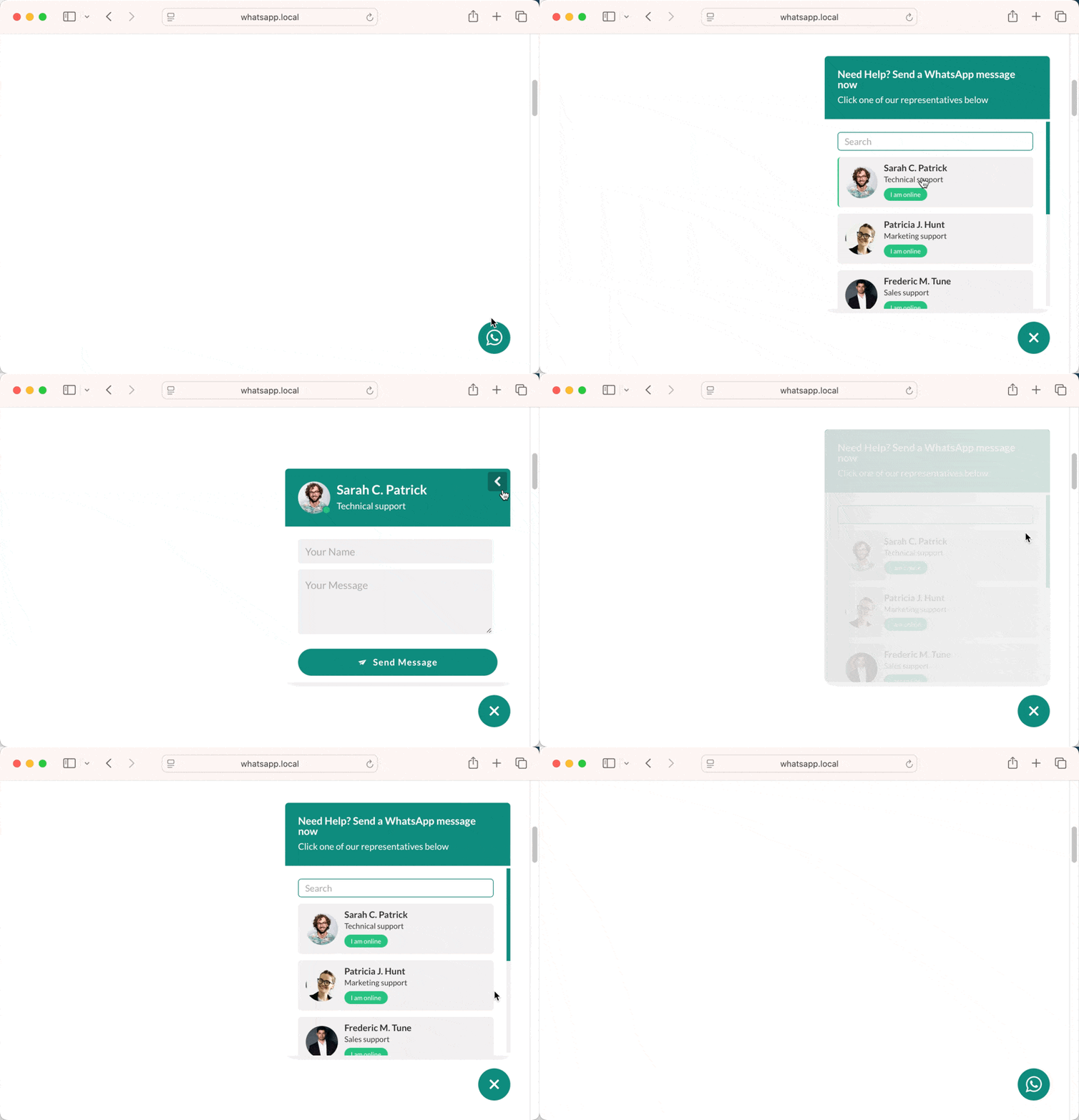
The WhatsApp Multi-Agent Form layout lets visitors select from multiple agents and submit a short form before opening WhatsApp.
This makes the chat experience more organized, more personal, and far more useful for businesses that handle different services, departments, team members, or regions.
This makes the chat experience more organized, more personal, and far more useful for businesses that handle different services, departments, team members, or regions.
Instead of a one-size-fits-all chat button, you get a guided flow:
Let visitors choose the right team member or department
Collect important details before the WhatsApp chat starts
Create more relevant and efficient conversations
Improve lead quality with structured input
Great for support, sales, bookings, and service inquiries
How the Multi-Agent Form Works
The visitor opens the floating chat
A chat interface appears on the page.
They choose an agent
This could be a sales rep, support person, consultant, or department.
They complete the form
You can collect the details you need before the conversation begins.
WhatsApp opens with context
The visitor is redirected to WhatsApp with a pre-filled message based on the submitted information.
Lead data can be stored
If lead collection is enabled, the submitted form data can also be saved in your dashboard.
Why Use a Multi-Agent Form Instead of a Basic Chat Button?
Better Routing
Help visitors reach the right person without confusion.
Smarter Lead Capture
Collect useful information before the conversation begins.
More Qualified Inquiries
Get cleaner, more relevant messages from the start.
Improved Team Workflow
Assign conversations based on role, skill, or service area.
More Professional Experience
Your chat feels structured, intentional, and business-ready.
Optional Submission Tracking
Save form submissions in the admin area when lead capture is enabled.
Need Help Getting Started?
Setting up the Single Agent Bubble is simple and quick. Follow our step-by-step documentation or upgrade to the Pro version to unlock more layouts, visibility rules, and integrations.
Best Use Cases for the Multi-Agent Form Layout
Sales Teams
Route visitors to the right rep based on product, service, or region.
Customer Support
Let users choose billing, technical support, or general help before they chat.
Agencies
Offer separate agents for design, development, marketing, or strategy.
Clinics and Consultations
Connect visitors with the right specialist or advisor.
Service Businesses
Collect inquiry details before opening WhatsApp to save time.
Large Teams
Keep WhatsApp conversations organized across multiple team members.
Frequently Asked Questions
Got questions about the Single Agent Bubble layout? Here are some quick answers to help you get started.